- cloud computing, specifically focusing on Amazon Web Services (AWS)
- Elastic Compute Cloud (EC2)
- Relational Database Service (RDS)
Before the advent of cloud computing, managing infrastructure on-premises posed several significant challenges:
-
Static IPs: To make a service accessible over the internet, you need a public IP address. However, public IPs, especially static ones, are a limited and costly resource. Allocating and managing these addresses on your own can be both expensive and technically demanding. Without a cloud provider, you need to purchase these IPs from an Internet Service Provider (ISP) and ensure your machines are always online, which requires constant power and stable internet connectivity.
-
NAT (Network Address Translation): NAT allows multiple devices within a private network to share a single public IP address when accessing the internet. Configuring and managing NAT without the help of a cloud provider adds complexity, especially if you need to handle this on a large scale for multiple services and clients.
-
Global Delivery: For services that need to be available globally, delivering them from a local infrastructure can result in poor performance. Users in geographically distant regions might experience high latency and slow response times. Managing a globally distributed infrastructure with local servers would be costly and inefficient without the scalability and geographic flexibility that cloud computing provides.
Cloud providers offer a fully managed infrastructure, meaning they handle the complexities of hardware maintenance, networking, and security. You can rent resources, such as servers, storage, and networking components, on-demand and scale them easily based on your needs. This eliminates the burden of managing physical servers and allows businesses to focus on building and deploying their applications.
Several major cloud providers offer infrastructure as a service (IaaS), including:
- Amazon Web Services (AWS): Offers a wide range of services, from computing to databases, machine learning, and security.
- Microsoft Azure: Provides integration with Microsoft products and services, including enterprise-level solutions for cloud and hybrid environments.
- Google Cloud Platform (GCP): Known for its strength in big data, machine learning, and containerized applications.
AWS RDS is a managed database service that simplifies the process of setting up, operating, and scaling a relational database in the cloud. With RDS, AWS takes care of the maintenance tasks such as backups, software patching, and scaling. This allows developers to focus on optimizing their applications instead of worrying about database management.
Amazon EC2 (Elastic Compute Cloud) is at the core of AWS's computing services. EC2 allows you to rent virtual servers, known as instances, which can be configured to meet your specific computing needs. These instances can run different operating systems, have varying amounts of CPU power, memory, and storage, and can be scaled up or down depending on demand. EC2 forms the backbone of cloud infrastructure for many applications, providing the computational resources necessary to run services in a scalable and flexible manner.
If you develop a web application (e.g., a Spring App) and run it locally on your machine, it’s only accessible to you. No one else can use this service because your machine is not publicly accessible over the internet. To make your application available to users worldwide, you need to configure it so that it can be accessed via the internet.
This leads us to two fundamental concepts:
- IP Address – The unique identifier for any device on the internet.
- NAT (Network Address Translation) – A method for allowing multiple devices within a private network to access the internet using a single public IP.
To understand how services are accessed over the internet, we first need to grasp how the internet works.
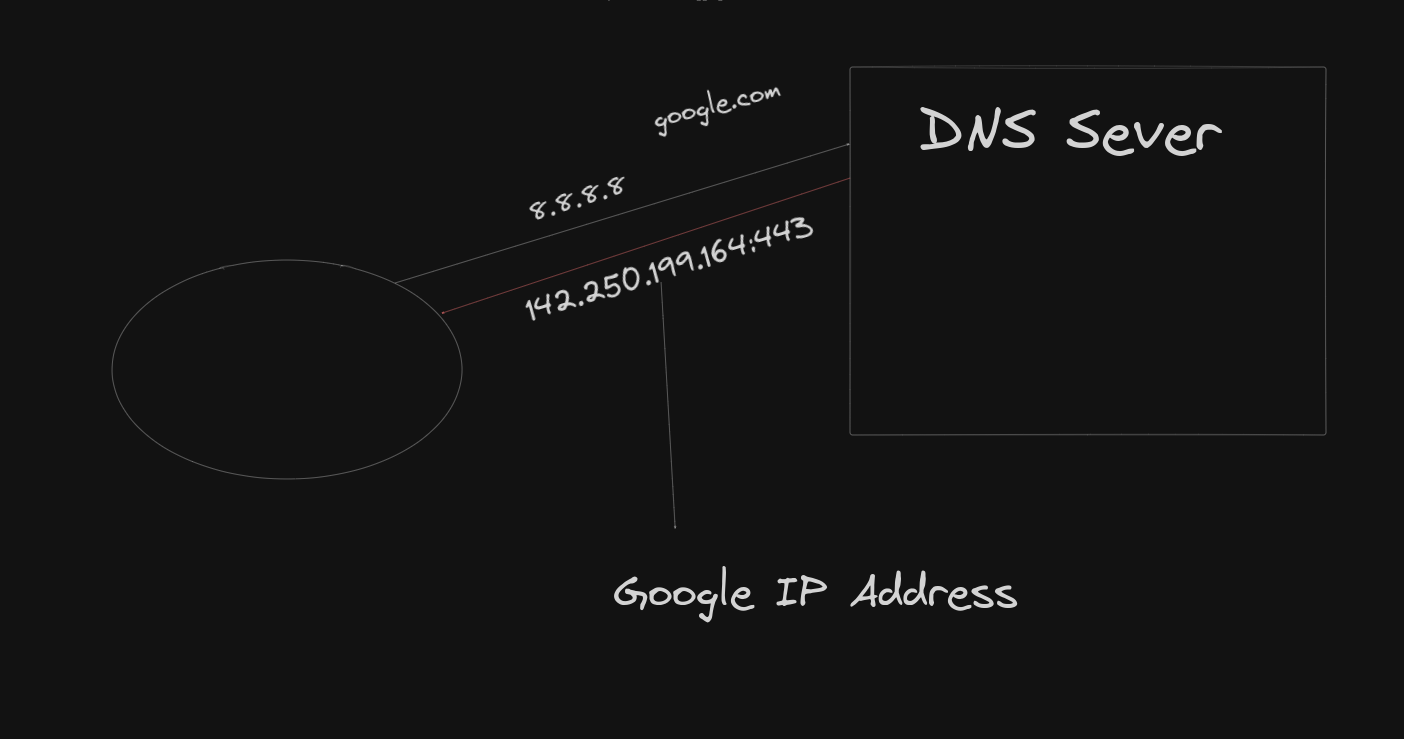
When you type a URL, such as google.com, into your browser, the browser doesn’t inherently know where Google’s servers are located. It needs to identify the exact location (IP address) of the Google server to send your request. Without knowing this address, the request wouldn’t reach its intended destination.
Think of an IP address as your home address in the physical world. When you order something online, the delivery person needs to know your address to bring the package to you. Similarly, the internet uses IP addresses to direct traffic to the correct server.
- Example: 172.168.1.1 is a common format for IPv4 addresses, consisting of four numbers separated by dots.
However, it would be impractical for users to remember numerical IP addresses for every website. This is where Domain Names come into play.
The Domain Name System (DNS) is essentially the phonebook of the internet. It translates human-friendly domain names (like google.com) into IP addresses that computers use to identify each other on the network.
- When you connect to the internet, your device is configured with a DNS server address (e.g.,
8.8.8.8, a public DNS server provided by Google). - When you type a URL, the DNS server resolves that domain into its corresponding IP address, allowing the request to reach the appropriate server.
-
IPv4: The most widely used version of the internet protocol, consisting of four 8-bit blocks. This gives IPv4 a total of 2^32 unique addresses, or approximately 4.3 billion.
- Example range: 0.0.0.0 to 255.255.255.255.
-
IPv6: To address the shortage of available IPv4 addresses, IPv6 was developed, offering 128-bit addresses. However, many devices (including older systems) still rely on IPv4.
- Subnetting: This involves dividing a large network into smaller sub-networks, making it easier to manage and conserve IP addresses.
- NAT: By using NAT, organizations can use a small number of public IP addresses to serve many devices within a private network. This is accomplished by dynamically assigning private IP addresses within the network and mapping them to a shared public IP when accessing the internet.
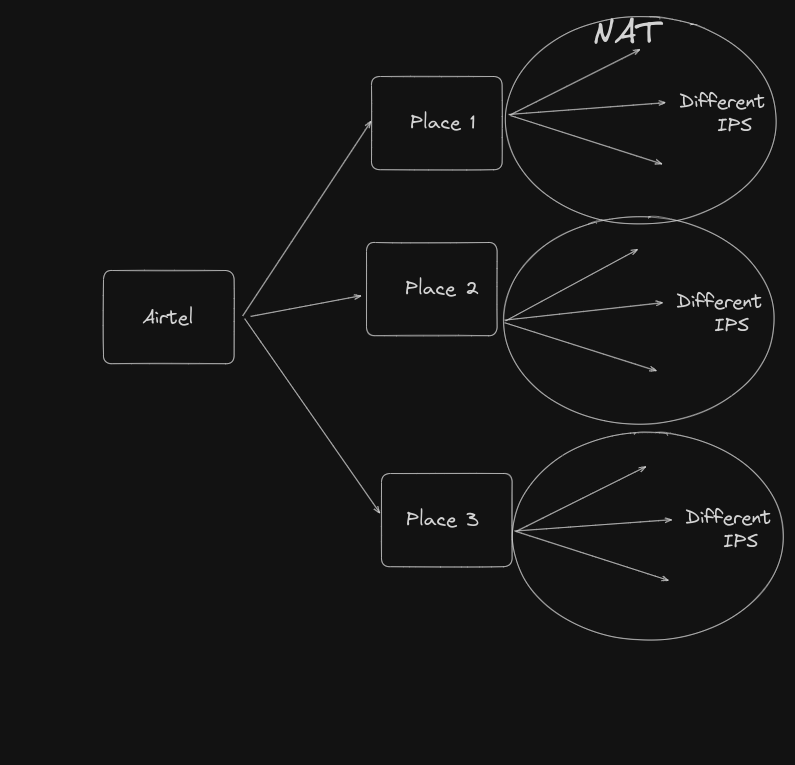
To make your website or service available to everyone over the internet, you’ll need a public static IP address. A static IP remains constant, unlike dynamic IPs that change periodically, making it ideal for web servers.
-
Rent from ISPs:
- Expensive and requires you to manage the server and network infrastructure yourself.
- You also need to ensure your server remains online (i.e., it’s always powered and connected to the internet).
-
Cloud Providers:
- Cloud providers, such as AWS, offer static public IPs as part of their services. They manage the hardware, networking, and power requirements, so you don’t have to worry about maintenance.
- Cloud providers offer a variety of services, such as AWS Elastic IPs, which are static IP addresses designed for dynamic cloud computing.
Cloud providers give businesses access to managed infrastructure, which reduces operational complexity and cost. Major cloud providers include:
- AWS (Amazon Web Services): The most popular and widely used cloud platform, offering a broad range of services.
- Azure (Microsoft): Integrated with Microsoft services, making it a preferred choice for enterprises.
- Google Cloud Platform (GCP): Known for its strengths in machine learning and data analytics.
Amazon EC2 is a foundational service within AWS, allowing users to rent virtual machines (referred to as "instances") to run their applications. With EC2, you can control every aspect of the virtual server, including the operating system, storage, networking, and security.
- AWS Free Tier: AWS offers a 12-month free tier for new users, allowing you to run services such as EC2 with limited resources. This is ideal for small projects or educational purposes.
-
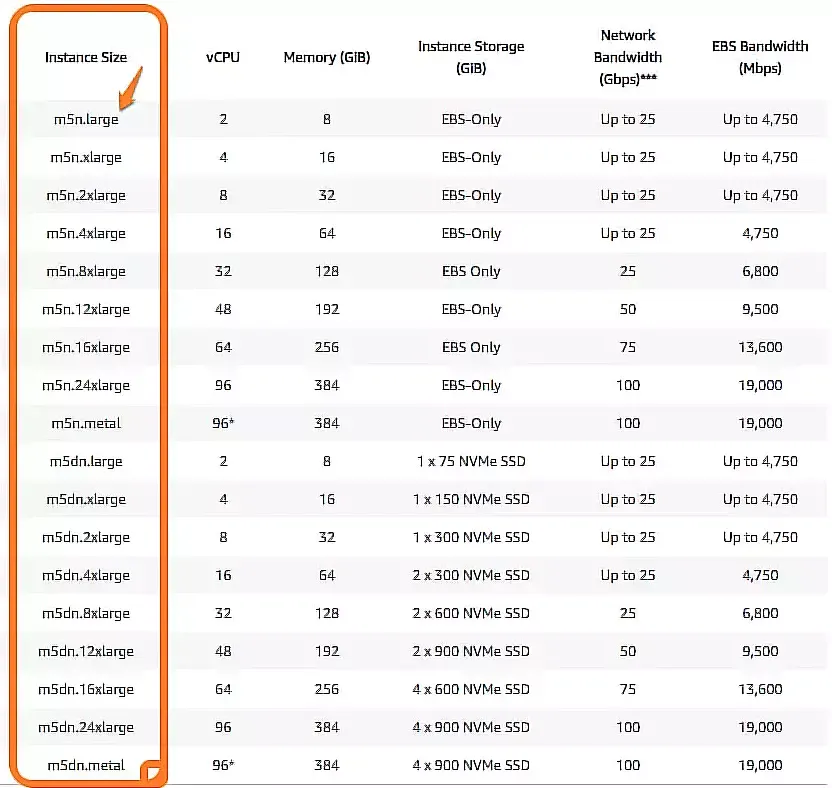
Instance Types: AWS provides various instance types based on computing power, memory, and storage. Each instance is optimized for different types of workloads.
- t2.micro: we will use the t2.micro instance, which is included in the free tier and is suitable for running small services.
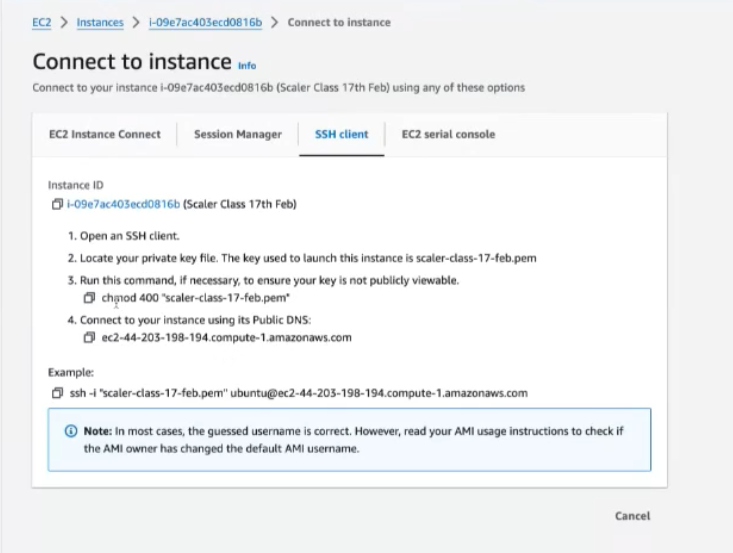
- Key Pair: When launching an EC2 instance, you generate a key pair (consisting of a public key stored on AWS and a private
key stored locally in a .pem file). This key pair is used to securely connect to your instance via SSH.
-
Connecting to the Instance: After launching the EC2 instance, you can connect to it using the private key. For example, on a Linux or macOS system, you would use the following SSH command:
ssh -i "your-key.pem" ec2-user@your-ec2-instance-public-ip

-
You can deploy simple services on your EC2 instance, such as a Flask application. However, by default, AWS blocks many ports for security reasons. For example, Flask runs on port 5000, but you won’t be able to access this port unless you configure the security group to allow inbound traffic on port 5000.
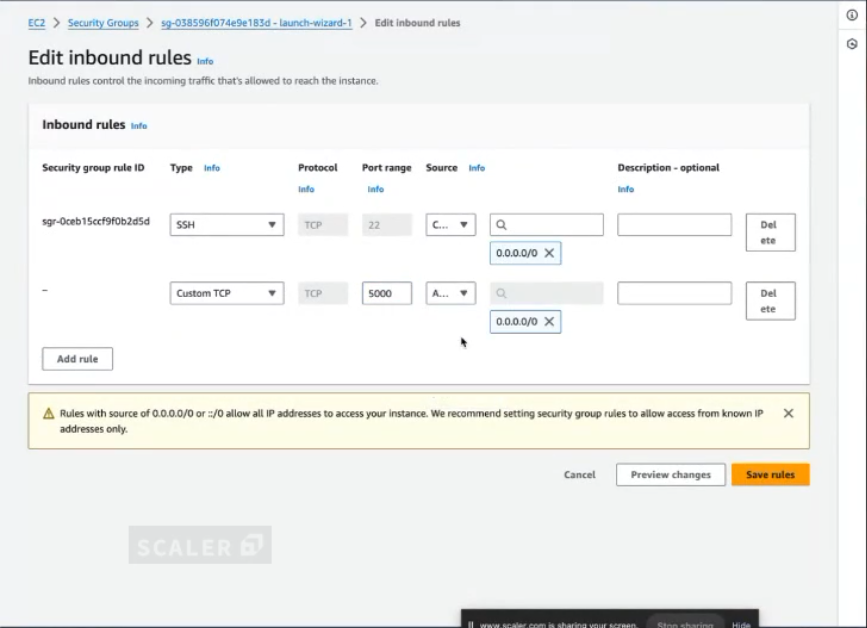
Once the security group is configured, your web application (e.g., Flask) will be accessible over the public internet using your EC2 instance’s IP address. This demonstrates how cloud services allow you to host and run applications remotely, without needing to maintain your own physical servers.