
A Linux TUI app to easily view and compare CPU utilization and memory pressure.
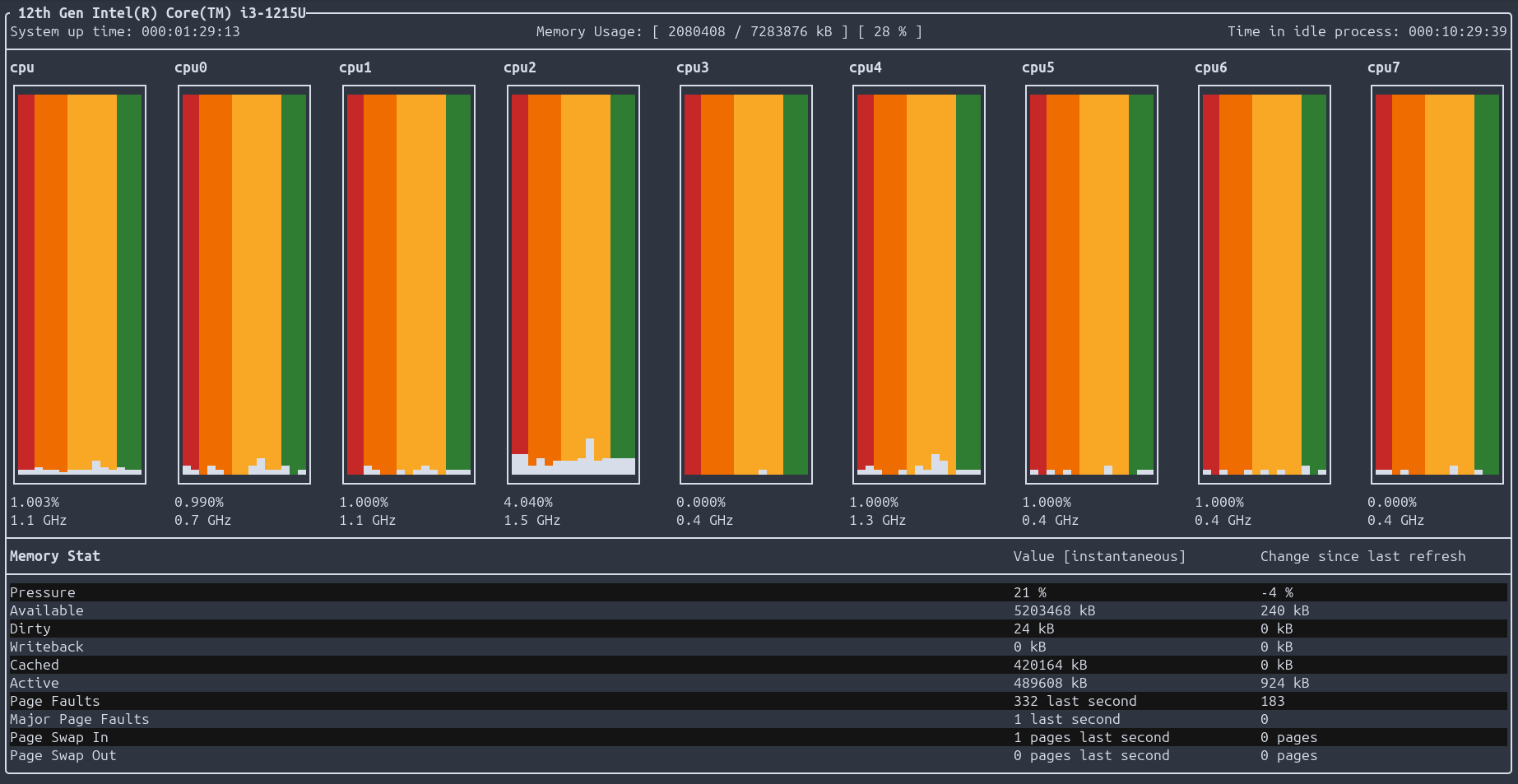
The goal of coretop is to provide a way to easily view and compare the load on both the memory and CPU of a system. To do this, coretop displays a variety of memory statistics, as well as per-core CPU utilization. Each CPU core has its own utilization graph. In these graphs, the white bars represent the utilization of that core, while the background color representsthe amount of pressure that the systems memory is under. There is also a variety of other memory information listed below the graphs.
The easiest way to install a stable version of coretop on an x64 or aarch64 system is to download a binary from the coretop releases. To install coretop on a different architecture, you will need to clone this repository and build coretop from source using the provided CMakelists.txt.
The coretop binaries are fully statically compiled, and have no dependencies.
- After downloading a binary or building coretop from source, you can add the following to
~/.bashrcto be able to run coretop from any directory:
export PATH=$PATH:</path/to/binary>- You can also rename the binary to make it easier to run:
mv coretop-x86_64 coretopor
mv coretop-aarch64 coretop- After coretop has been added to your path and renamed, you can run it anywhere with:
coretopGPL-3.0