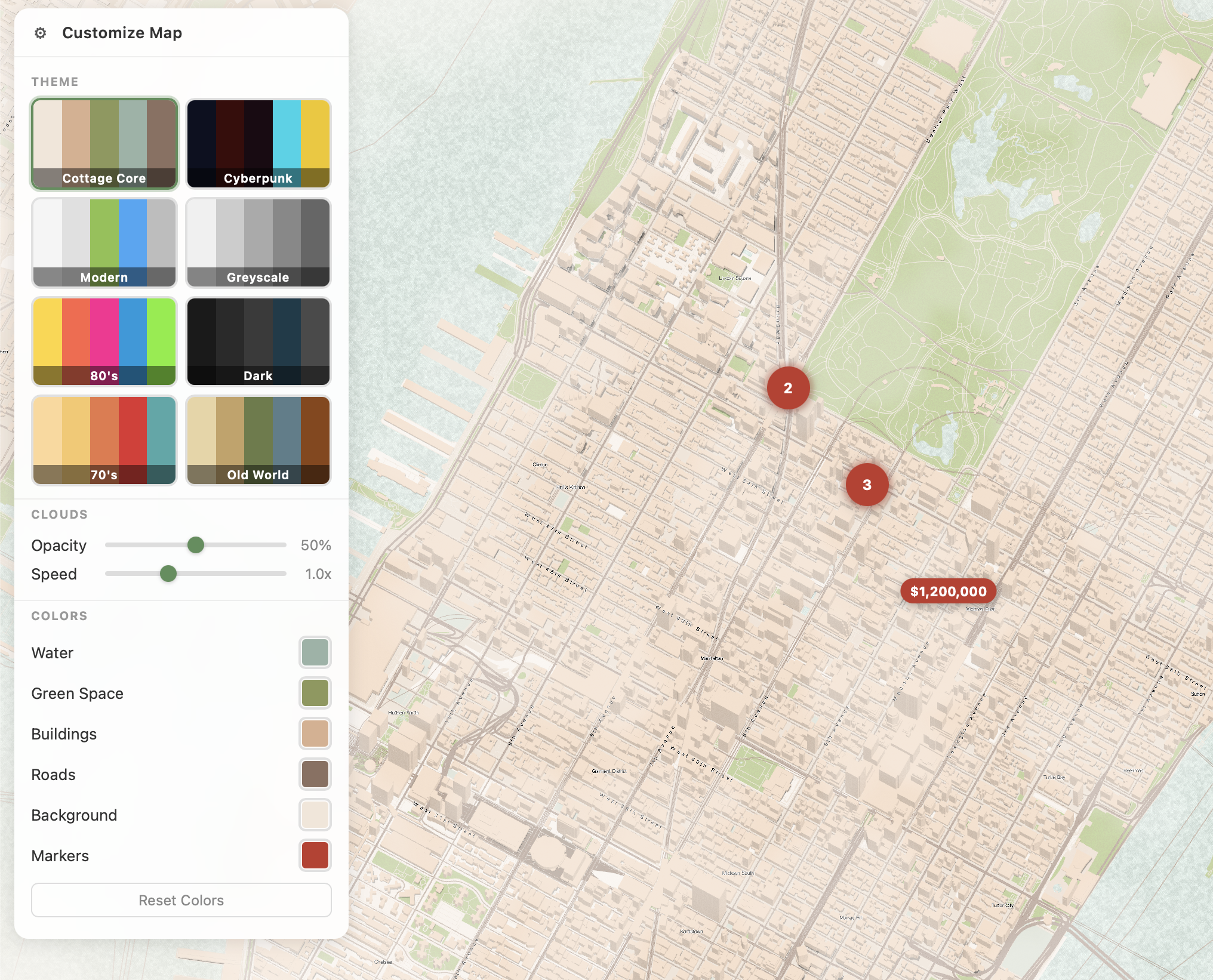
A 3D map renderer powered by WebGPU and Rust/WASM. Renders OpenStreetMap data as textured 3D geometry with buildings, roads, parks, water, trees, and labels — directly in the browser.
- WebGPU + WebGL2 fallback — hardware-accelerated 3D map with materials and shadows, works in Chrome, Firefox, and Safari
- PMTiles support — load vector tiles from a single static file (no tile server needed)
- MVT decoding — reads Mapbox Vector Tiles and generates 3D geometry
- Tiled loading — streams map data as you pan and zoom
- Curved road labels — street names follow road geometry
- Procedural clouds — animated cloud overlay with adjustable opacity and speed
- Theme system — 8 built-in themes (Cottage Core, Cyberpunk, Modern, Dark, Greyscale, 80's, 70's, Old World) with full color customization
- Marker clustering — nearby markers merge into clusters with animated liquid blob effects
- Customize panel — built-in UI for themes, colors, and cloud controls (can be hidden)
- WASM — compiles to WebAssembly for near-native performance
- Safari compatible — bypasses winit for WASM, uses Depth24Plus, dynamic MSAA, OffscreenCanvas fallback
- JavaScript API — simple JS wrapper for easy integration
# Build the WASM module and web worker
make build-web

# Or build and serve locally
make serve<div id="map" style="width: 100%; height: 500px;"></div>
<script type="module">
import { createPolyMap } from 'polymap';
const map = await createPolyMap('#map', {
center: { lat: 40.765, lon: -73.980 },
zoom: 0.8,
tilt: 1.35,
pmtilesUrl: '/tiles.pmtiles',
showControls: true, // built-in customize panel (default: true)
});
// Add markers
map.addMarker('apt-1', 40.764, -73.978, {
html: '<div class="pin">$4.2M</div>',
});
// Theme colors
map.setColors({
water: [0.04, 0.09, 0.16, 1.0],
park: [0.10, 0.04, 0.07, 1.0],
building: [0.23, 0.04, 0.04, 1.0],
road: [0.0, 0.83, 0.91, 1.0],
land: [0.05, 0.06, 0.13, 1.0],
});
// Cloud controls
map.setCloudOpacity(0.5);
map.setCloudSpeed(1.0);
// Events
map.on('ready', () => console.log('Map ready!'));
map.on('marker:click', ({ id }) => console.log('Clicked:', id));
</script>See js/README.md for the full API reference.
| Method | Description |
|---|---|
setView(lat, lon, zoom?) |
Pan and zoom to position |
setColors(config) |
Set color overrides for water, park, building, road, land |
setCloudOpacity(0-1) |
Cloud transparency |
setCloudSpeed(0-3) |
Cloud animation speed |
setLayerVisible(layer, bool) |
Toggle buildings, roads, water, parks, trees, shadows, labels, clouds |
addMarker(id, lat, lon, opts?) |
Add a marker (nearby markers auto-cluster) |
showControls() / hideControls() |
Toggle the customize panel |
src/               Core Rust library (WebGPU renderer, tile manager, MVT decoder)
  lib.rs           App entry point, WASM bootstrap (RAF loop, DOM events)
  gpu.rs           WebGPU/WebGL2 device initialization, dynamic MSAA
  renderer.rs      Render pipeline (map geometry, shadows, text, clouds)
  tiles.rs         Tile manager (loading, caching, visibility)
  camera.rs        3D camera with smooth zoom/pan/tilt, uniform buffer
  mapdata.rs       OSM data parsing and geometry generation
  mvt.rs           Mapbox Vector Tile protobuf decoder
  mvt_convert.rs   MVT to 3D geometry converter
  pmtiles.rs       PMTiles v3 reader (HTTP range requests)
  text.rs          Text rendering (glyph atlas, curved labels, theme-aware colors)
  texture.rs       Material texture system
  api.rs           JavaScript API bindings (wasm-bindgen)
  config.rs        Configuration types (colors, layers)
  map.wgsl         Main shader (materials, color tints, procedural clouds)
  text.wgsl        Text rendering shader

js/                JavaScript wrapper library
  src/
    polymap.js     High-level JS API (createPolyMap, markers, clustering, controls panel)
    index.js       Package entry point

polymap-worker/    Web Worker for off-main-thread tile processing
  src/
    lib.rs         Worker entry point (MVT decode + triangulation)

web/               Demo application
  index.html       Standalone demo with themes, markers, and controls
The built-in customize panel includes 8 themes:
- Cottage Core — warm peach, sage, and olive tones (default)
- Cyberpunk — dark navy with neon cyan roads and deep red buildings
- Modern — clean whites with material design accents
- Dark — near-black background with charcoal buildings
- Greyscale — monochrome
- 80's — neon yellow, pink, cyan, and green
- 70's — retro cream, orange, red, and teal
- Old World — parchment, antique gold, and slate
All colors are customizable via the panel or setColors() API.
# Install Rust and wasm-pack
curl --proto '=https' --tlsv1.2 -sSf https://sh.rustup.rs | sh
cargo install wasm-pack

# Clone and build
git clone https://github.com/CottageHop/PolyMap.git
cd PolyMap
make build-web

# Serve the demo
make serve
# Open http://localhost:8080See CONTRIBUTING.md for guidelines.
MIT License. See LICENSE.