




Type
ns-, get the element.
Angular · Core (XML) · Vue · React · Svelte
Built for
@nativescript/corev9 — currently9.0.20.
Every NativeScript UI component, layout, gesture, and iOS icon — as a snippet, in your flavor's syntax. Stop hand-typing <StackLayout>, memorizing which props a ListView takes, or rewriting the same markup when you switch frameworks. This pack ships every element three ways — bare, with properties, and fully documented — for all five flavors, generated straight from @nativescript/core v9 types so the properties and events always match the framework.
Full prefix reference → · Snippet spec & generation pipeline →
- Install the extension (see below).
- Open a NativeScript view —
.html(Angular),.xml(Core),.vue,.tsx/.jsx(React), or.svelte. - Type a prefix —
ns-button,ns-stack-layout,ns-list-view,ns-tap,ns-icon-stop— and accept it from IntelliSense. - Tab through the property placeholders and fill them in. Done.
Suffix cheat-sheet:
ns-button→ the bare tag ·ns-button-prop→ every property as a Tab-stop ·ns-button-comp→ properties + events + an inline doc table.
- One prefix, every flavor —
ns-buttonworks whether you're in Angular HTML, Core XML, a Vue SFC, a React.tsx, or a Svelte component; the snippet emits the right tag case and event syntax for each. - Three levels of detail — bare for speed,
-propfor every property as a Tab-stop,-compfor properties + events + a documented property/event table inline. - Generated from
@nativescript/corev9 — currently9.0.20; every property, type hint, and event is extracted from the framework's TypeScript types, so the snippets can't drift from the API. - Smart hints — enum props expand to their allowed values (
orientation="(horizontal|vertical)"), and two-way-bindable props use each flavor's binding syntax (Angular[(checked)], Sveltebind:checked). - Everything you reach for — every UI component, all seven layout containers, ready-made example layouts (
ns-<layout>-snippet-N), eight gestures, and 24 iOS system-icon values. - Pure, declarative, private — no runtime, no dependencies, no telemetry; just snippet JSON contributed to VS Code.
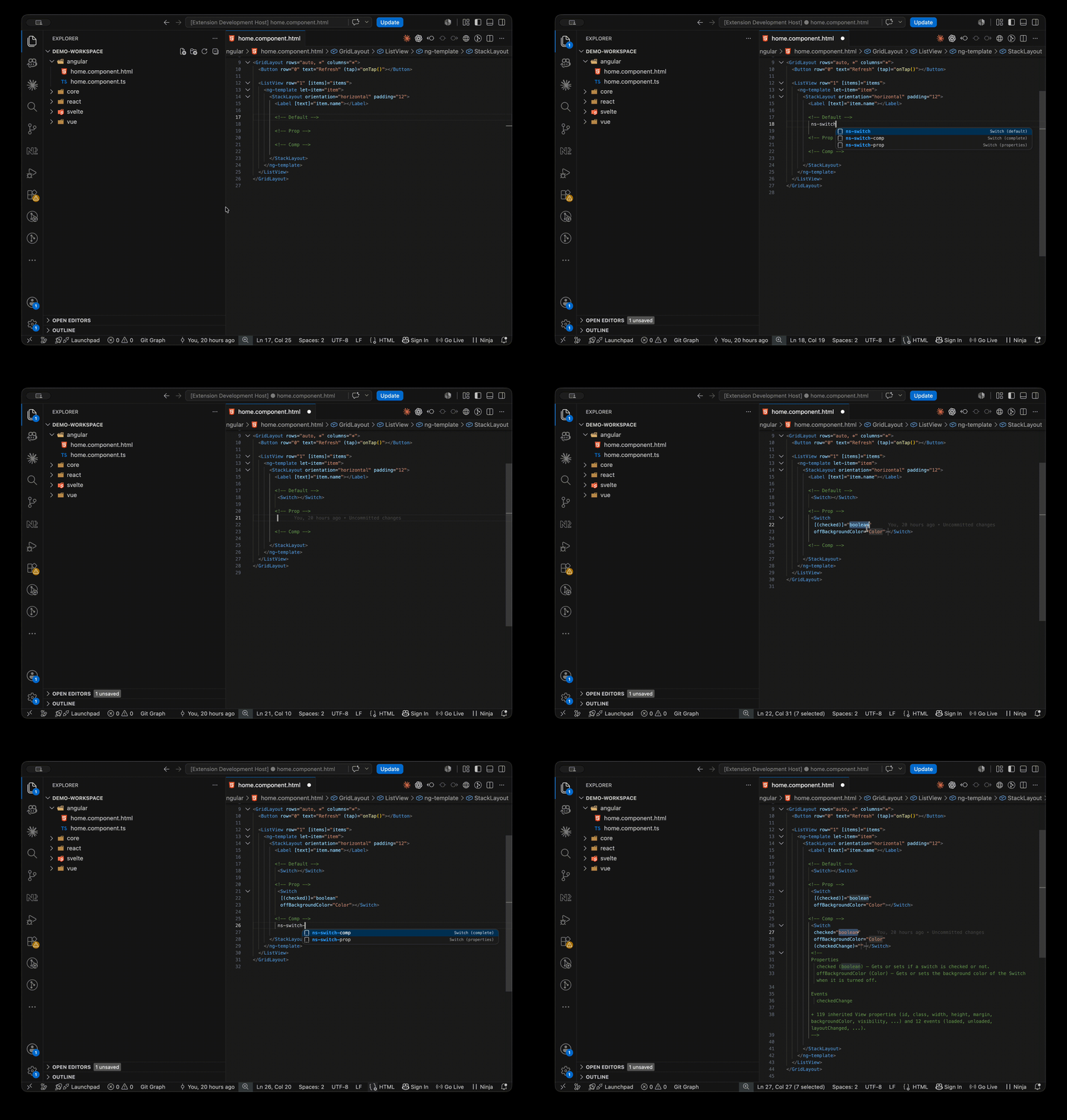
Every component and layout ships in three variants. Here's the same Switch, three ways — exactly what lands in your editor:
<Switch></Switch>Every property becomes a Tab-stop. Two-way-bindable props use the flavor's binding syntax:
<Switch
  [(checked)]="boolean"
offBackgroundColor="Color"></Switch>Properties and events, plus an inline doc comment listing each one — and a reminder of how many inherited View properties the element also accepts:
<Switch
  checked="boolean"
  offBackgroundColor="Color"
  (checkedChange)="">
</Switch>
<!--
Properties
  checked (boolean) — Gets or sets if a switch is checked or not.
  offBackgroundColor (Color) — Gets or sets the background color of the Switch when it is turned off.

Events
  checkedChange

+ 118 inherited View properties (id, class, width, height, margin, backgroundColor, …) and 12 events (loaded, unloaded, layoutChanged, …).
-->
Bigger elements scale the same way —
ns-button-proplays out every one ofButton's properties andns-text-field-propevery property ofTextField, each as a numbered Tab-stop you can fill or skip.
ns-button adapts to whichever file you're in — PascalCase tags for Angular/Core/Vue, camelCase for React/Svelte, and the right event syntax for each:
<!-- Angular (.html) -->
<Button (tap)="onTap()"></Button>

<!-- Core (.xml) -->
<Button tap="onTap" />

<!-- Vue (.vue) -->
<Button @tap="onTap" />

<!-- React (.tsx / .jsx) -->
<button onTap={onTap} />

<!-- Svelte (.svelte) -->
<button on:tap={onTap} />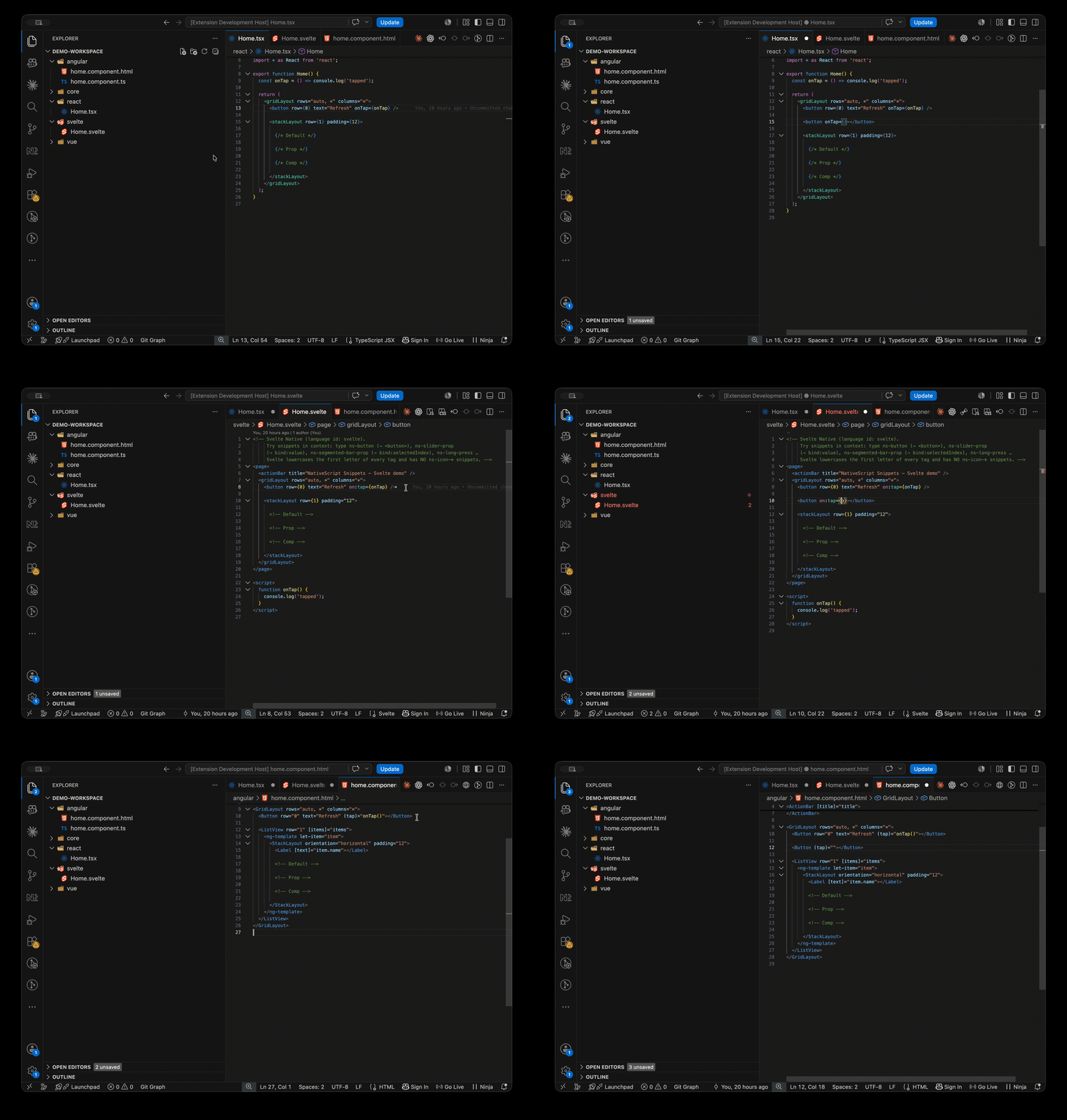
All seven layout containers — ns-stack-layout, ns-grid-layout, ns-flexbox-layout, ns-dock-layout, ns-absolute-layout, ns-wrap-layout, ns-root-layout — ship the three variants, plus ready-made example layouts under ns-<layout>-snippet-N:
<!-- ns-dock-layout-snippet-2 -->
<DockLayout width="210" height="210" backgroundColor="lightgray" stretchLastChild="true">
  <Label text="left" dock="left" backgroundColor="red"></Label>
  <Label text="top" dock="top" backgroundColor="green"></Label>
  <Label text="right" dock="right" backgroundColor="blue"></Label>
  <Label text="bottom" dock="bottom" backgroundColor="yellow"></Label>
</DockLayout>Eight gesture bindings, one prefix each — adapted to the flavor's event syntax:
| Prefix | Angular | Core | Vue | React | Svelte |
|---|---|---|---|---|---|
ns-tap |
(tap)="" |
tap="" |
@tap="" |
onTap={} |
on:tap={} |
…plus ns-doubleTap, ns-longPress, ns-swipe, ns-pan, ns-pinch, ns-rotation, and ns-touch.
ns-icon-* expands to the numeric ios.systemIcon value for an ActionItem — e.g. ns-icon-stop → 14:
<ActionItem ios.systemIcon="14"></ActionItem>24 icons in all (ns-icon-done, ns-icon-search, ns-icon-trash, …) — see reference.md for the complete list.
This extension contributes 805 snippets across five NativeScript flavors, generated from @nativescript/core v9.0.20. See reference.md for the full prefix tables.
| Flavor | Language id(s) | Snippets |
|---|---|---|
| Angular | html |
182 |
| Core (XML) | xml |
179 |
| Vue | vue |
149 |
| React | typescriptreact, javascriptreact |
143 |
| Svelte | svelte |
152 |
Vue and Svelte snippets require the Vue (Volar) and Svelte language extensions respectively — without them VS Code has no
vue/sveltelanguage to attach to, and the snippets stay dormant until installed.
| Prefix | Expands to |
|---|---|
ns-<name> |
the bare element |
ns-<name>-prop |
element + its primary properties as tab-stops |
ns-<name>-comp |
properties + events + a documented property/event table |
ns-<layout>-snippet-N |
(layouts only) a complete ready-made example layout |
Most prefixes work in every flavor; a few are flavor-specific: ActionBarExtension (Angular only), NavigationButton (not in React), Repeater (not in Vue and React), RootLayout (not in React), SplitView (Angular/Core only).
| Flavor | Language id(s) | per-flavor syntax (illustrative — tag case + property + event) |
|---|---|---|
| Angular | html |
<Button text="…" (tap)="onTap()"> |
| Core | xml |
<Button text="…" tap="onTap" /> |
| Vue | vue |
<Button text="…" @tap="onTap" /> |
| React | typescriptreact, javascriptreact |
<button text="…" onTap={onTap} /> |
| Svelte | svelte |
<button text="…" on:tap={onTap} /> |
Requires VS Code 1.30.0 or later.
- Marketplace: Extensions view (Cmd/Ctrl+Shift+X) → search NativeScript Snippets by ElecTreeFrying → Install.
- CLI:
code --install-extension ElecTreeFrying.nativescript-angular-html-snippets - Direct: VS Code Marketplace listing
- Cursor / Windsurf / VSCodium / Gitpod: Search NativeScript Snippets in the Extensions panel — served via Open VSX.
- VS Code: 1.30.0 or later.
- Registries: Available on both the VS Code Marketplace and Open VSX.
- Compatible hosts: Cursor, Windsurf, VSCodium, Gitpod, Code Server, and other forks that implement the VS Code API at the same engine version — installable directly from their Extensions panel via Open VSX.
- Web: Runs on vscode.dev and github.dev — it's a pure declarative extension, so there's no native code to hold it back.
- Languages: Angular (
html), Core (xml), and React (typescriptreact/javascriptreact) work out of the box; Vue and Svelte require the Vue (Volar) / Svelte language extensions. - Footprint: Pure declarative snippet JSON — zero runtime dependencies.
- Telemetry: None. Everything runs locally.
If a prefix doesn't expand, snippets don't appear in .vue / .svelte files, or a .vue template inserts the Angular form ((tap) instead of @tap) — see SUPPORT.md for symptom → cause → fix.
That includes the common case where Svelte snippets fire between elements but not inside an element's opening tag.
Still stuck? Please open an issue on GitHub Issues.
See CHANGELOG.md for full release notes.
Contributions, bug reports, and feature requests are welcome in GitHub Issues. Snippets are generated, not hand-written — see SUPPORT.md for the build/validate workflow and the architecture overview.
See SPEC.md for the snippet grammar and generation pipeline — behavior changes belong there too.
This extension is free and always will be. If it's become part of your workflow, here are a few ways to give back:
- Star the repo on GitHub
- Leave a review on the VS Code Marketplace
- Send a donation to any address below
| Network | Address |
|---|---|
| Bitcoin | bc1q4j2uewfphjmca83905qv37vcl4jh8va5yupl7w |
| Solana | EHtTGyRoDAK44KBGrEoypAWyPpResHUqwufKnuLs7Tyy |
| Sui | 0xcaf8ff4a65d7e35d961abd0203180013b7fe974d4fa0313e880c39c45ada2b09 |
| ERC-20 (Ethereum / Base / Monad / Polygon / HyperEVM) | 0xd25f84Ed2F76dF2F0C8f1207402eF9e15b5d7855 |
- All extensions by ElecTreeFrying on the VS Code Marketplace.