Documentation • PyScript gallery • Product packages • Screenshots
 |
 |
|---|---|
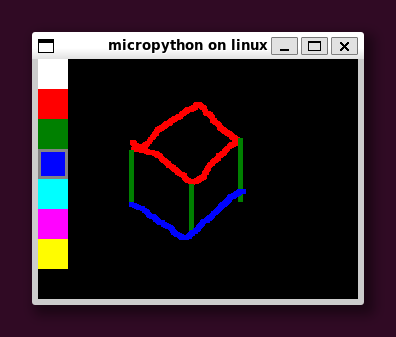
paint.py |
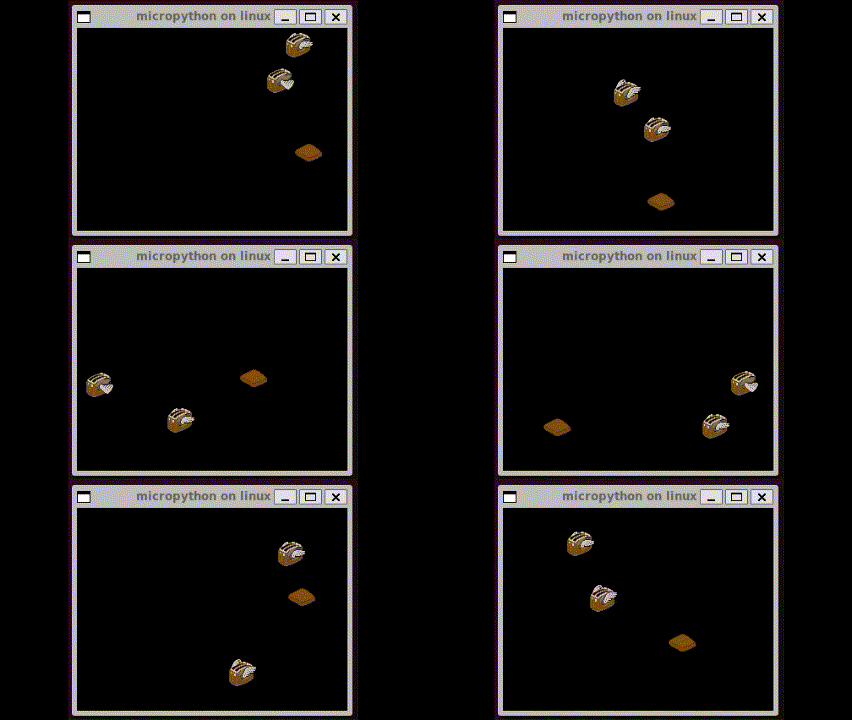
tiny_toasters.py |
This repository is the examples, integration documentation, and browser gallery for the PyDevices driver ecosystem. The reusable product source lives in pydevices:
displaydevandaudiodevprovide portable display and audio interfaces.events,keys, andmultimerprovide shared event, key, and timing primitives.appdevis an optional application traffic controller for non-LVGL apps.board_configs,board_peripherals, and hardware drivers connect those interfaces to real boards and desktop/browser hosts.
Those libraries are designed to work across MicroPython, CircuitPython, and CPython on microcontrollers, Linux, Windows, Android, browsers, and notebooks. This repo demonstrates that portability; it is not the package source of truth.
Alpha quality. The organization is being prepared for its first external users, so names and APIs may still evolve.
The fastest route is the installable PyScript gallery. It runs the real examples in a browser and can be installed as a Progressive Web App. Start a standalone browser app from the pyscript-template, or use the PWA guide to understand and customize the full gallery shell.
For a desktop clone:
git clone https://github.com/PyDevices/pydevices-examples.git
cd pydevices-examples
python3 -m venv .venv
.venv/bin/pip install --index-url https://test.pypi.org/simple/ \
  --extra-index-url https://pypi.org/simple/ -r requirements.txt
cd lib
../.venv/bin/python examples/pydevices_demo.py
On Windows, use the equivalent .venv\Scripts\python.exe commands.
For MicroPython, install unprefixed MIP package names from the PyDevices PyDevices MIP index, then install a board package:
import mip

INDEX = "https://PyDevices.github.io/mip"
mip.install("pydevices", index=INDEX)  # displaydev, appdev, and the rest of lib/
See the pydevices install workflows and board configs for complete device setup.
Board configs describe hardware. They export neutral pieces such as
display_drv, touch_read, host_read, and timer_async; they do not create
an application runtime.
Non-LVGL examples in this repo opt into the optional appdev coordinator:
import board_config
from board_config import display_drv
import appdev

runtime = appdev.App(board_config)

runtime.run_forever()
LVGL examples use the coordinator bundled with the LVGL binding and do not
import appdev:
from board_config import display_drv
from display_driver import runtime

runtime.run_forever()
This separation keeps hardware policy out of board configs and lets applications provide a different event loop or traffic controller when appropriate.
Python distributions on TestPyPI use the organization prefix; imports and MIP
packages remain conventional and unprefixed. pydevices ships all of the core
lib/ tree as one distribution -- MIP publishes those components separately,
because installing only what a board needs matters there.
| TestPyPI distribution | Python import / MIP name |
|---|---|
pydevices |
displaydev, audiodev, appdev, events, keys, multimer, boarddev |
pydevices-pygraphics |
pygraphics |
pydevices-palettes |
palettes |
pydevices-pdwidgets |
pdwidgets |
pydevices-lvgl |
lvgl |
| Path | Purpose |
|---|---|
lib/examples/ |
Portable examples and complete demo applications |
lib/utils/ |
Example helpers and third-party GUI adapters |
.site/pyscript/ |
PyScript gallery and reusable PWA shell |
docs/ |
Peter Hinch GUI integration, the TFT GUI stub, and screenshots |
tools/ |
Cross-runtime example and LVGL test harnesses |
packages/ |
GitHub MIP manifests for examples and helpers |
- pydevices — canonical product source and core driver package home
- mip — PyDevices MIP index fork
- lvgl-bindings — shared LVGL binding and
display_driversource - lvgl-micropython, lvgl-circuitpython, and lvgl-python — runtime-specific LVGL distributions
- pygraphics, palettes, and pdwidgets — companion packages
- android-template — Android application packaging
- pyscript-template — standalone installable PyScript PWA starter
.venv/bin/python -m unittest discover -s tests
.venv/bin/python -m pytest -s tests -q
.venv/bin/ruff check lib tests tools scripts
See AGENTS.md and tools/README.md for the cross-runtime example matrix. Contributions to reusable libraries and hardware support belong in pydevices; examples, integrations, and gallery work belong here.
MIT. See LICENSE.