Releases: SammyKrosoft/Start-E2016ServerComponentsCheck
Releases · SammyKrosoft/Start-E2016ServerComponentsCheck
Exchange 2013/2016 Server Components checker

- v1.7.0 - added "Edge" checkbox to check Edge servers only, and fixed Requester information to see which requester stopped or
started the component for the last time. - v1.6.5 - changed ExchToolsCheck to test on "Get-ExchangeServer" instead of "Get-Mailbox" to be usable on Edge servers
Minor updates
- v1.6.4 - added Github link in description
- v1.6.3 - added PSScriptInfo and update Description for PSGallery publishing
- v1.6.2
added | out-null after test-ExchTools Exchange tool checker call - v1.6.1
added GUI error message when Exchange tools not present
Exchange 2013/2016 Server Components checker
Change history
- v1.6.2
just added out-null after Exchange tools test function call - v1.6.1
added GUI error message if tool not launched from an Exchange Management Shell or PowerShell Exchange-enabled host - v1.6
Excluded Edge servers for cases when Edge are installed on the AD forest instead
of the recommended DMZ (??)
Added HealthAPI requester - v1.5.4
Add maple leaf as icon - v1.5.3
Add about (hidden) - v1.5.2
Added version number in Title - v1.5.1
Deactivate the form while running
Reactivate the form while running - v1.5:
Added ability to filter by server or display for all servers (# Servers...)
Added basic stats (# active components / # inactive components) - v1:
First published version
Exchange 2013/2016 Server Components checker - v1.5.1/2/3/4
Same as v1.5 - added version number in form title, Canadian icon,...
Exchange 2013/2016 Server Components checker - Server filtering
v1.5.1:
Deactivate form while running, reactivate when done.
v1.5:
Added ability to filter by server or display for all servers (# Servers...)
Added basic stats (# active components / # inactive components)

Exchange 2013/2016 Server Components checker - Added Requester Choice
Added Requester choice when we need to start all the Components on all servers.
Added test on PowerShell version (v3 required), otherwise we inform the user and quit the application.
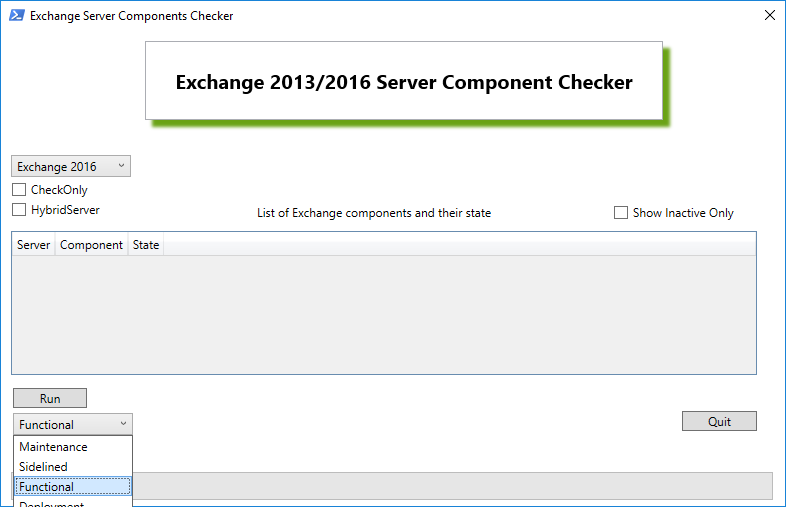
Exchange 2013/2016 Server Components checker - first working version !
Better version - you can check "Show Inactive Only" before running the tool to query Exchange Server Components
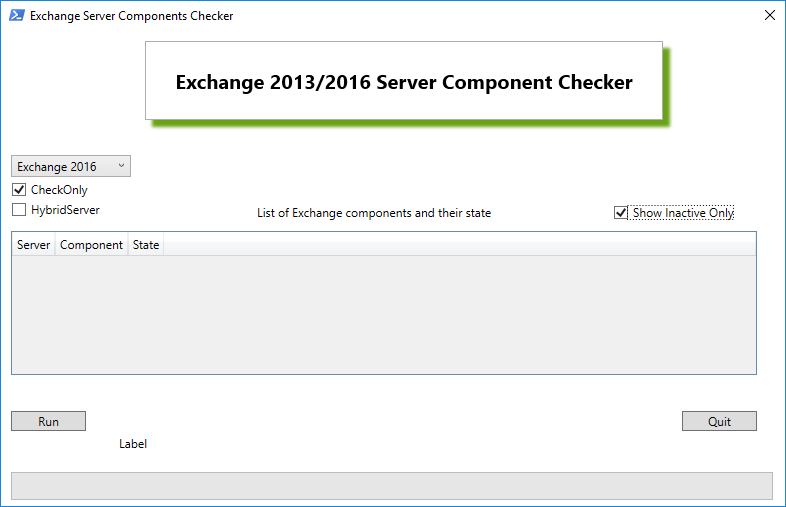
2 scripts : the non-GUI version and the GUI version (the best for visual interaction - it's the one that gave me the most headaches).
- Non-GUI version is pretty simple, just use the script as-is or with -CheckOnly switch
- GUI version is best, because you have the choice to check Exchange 2013 and Exchange 2016 server through a drop down list (aka "comboBox" in WPF language).
Will improve, fix, simplify this version overtime, stay tuned for future releases...