FAll22 ECE SoftwareLab
Senior Lab Project for 'Project Management' demo. Allows the creation of users, which are assigned to a
'Default' Project. Each project shares two hardware sets, to simulate the sharing of resources.
Negative inputs for checking in or checking out hardware is treated as a positive number.
Leaving a project is functional, user 111 and user 222 have multiple projects as of 12/1
 and can be accessed with password 'world'.

Created using NPX Create-React-App with Typescript framework, Flask Routing,
reacter-dom-v6 for multipage routing and pymongo as our database.
It's hosted using Heroku (if link still works) at
https://software-lab-project.herokuapp.com/

Frontend and routing written by Kenneth P.
Backend by Spence S.
Debugging and emotional support by Michael R., Emma M., Aarya A.

🔌 https://github.com/thehubisgitted
User Documentation
User Login
- Sign In: To sign in a user must put in their User ID and password

- Create Account: A user account can be created by inputting a Username, User ID, password, and password confirmation

- Link: https://software-lab-project.herokuapp.com/
Project Registration/Views
- All new registered users are initialized into the Default Project

- As of now, users can only register for projects manually through calling the function addUserToProjects()
- The views page will show all Projects that a user is registered for, allowing for check-in and check-outs
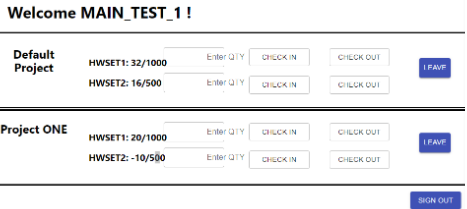
- Users can leave projects br pressing the leave button next to the respective project
- Link: https://software-lab-project.herokuapp.com/projects
Hardware Set Page
- The projects page shows the information for the current project, name, and availability
- The main interface shows the availability of sets
- A user can check in or check out hardware to/from either set by entering a value in the text field, and then clicking the check in or check out buttons for the respective hardware set to adjust the storage capacity for the project and set.
- User is allowed to either log out, or leave the project by pressing the respective buttons
