Plan less. Ship more. Together.
🚀 30+ API Endpoints 🔐 OAuth + JWT Auth 📊 4 Analytics Modules 👥 8-Level RBAC 📱 PWA Ready ⚡ Deno Deploy






| Metric | Value |
|---|---|
| API Endpoints | 30+ |
| Role Levels | 8 (4 global + 4 per-project) |
| Authentication Methods | 3 (Email, Google OAuth, GitHub OAuth) |
| Analytics Modules | 4 (Dashboard, Per-Project, Portfolio, Health) |
| Database Collections | 8 |
| Frontend Islands | 44 |
| Routes | 15 |
| PWA Support | Yes |
| Database | MongoDB Atlas |
| Deployment | Deno Deploy (production) |
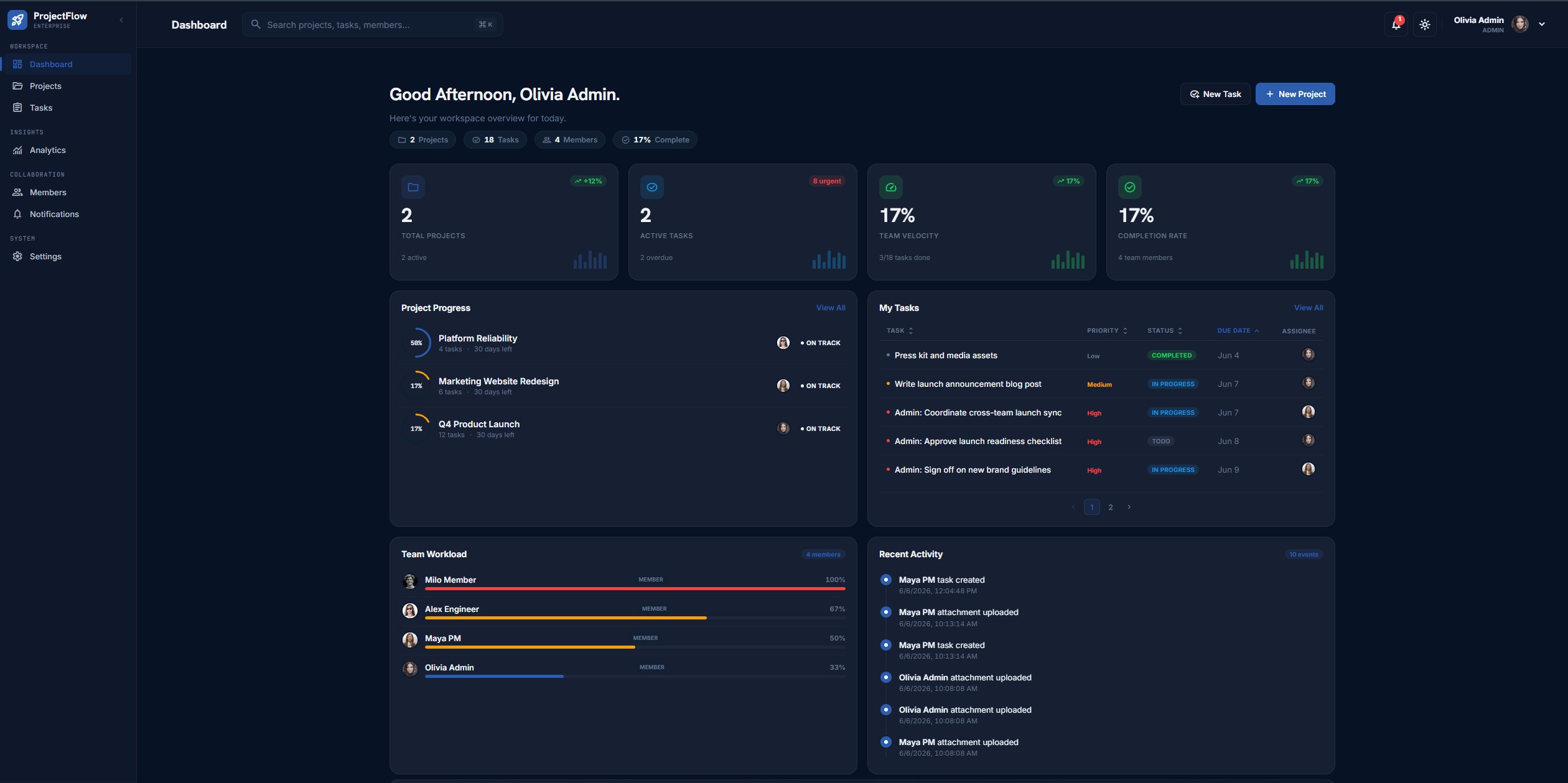
Jump straight into the live app at projectflow.engsiam.deno.net using any of these demo accounts:
| Password | Role | What you can explore | |
|---|---|---|---|
admin@projectflow.dev |
Admin#12345 |
ADMIN | Full access — create/delete projects, manage members, all analytics |
olivia@projectflow.dev |
Olivia#12345 |
PROJECT_MANAGER | Create projects, invite members, manage tasks |
liam@projectflow.dev |
Liam#12345 |
TEAM_MEMBER | Kanban board, comments, file uploads |
noah@projectflow.dev |
Noah#12345 |
VIEWER | Read-only: browse projects, tasks, charts, reports |
| Feature | ProjectFlow | Typical CRUD App |
|---|---|---|
| Authentication & JWT Sessions | ✓ | ✓ |
| Kanban Workflow (Drag & Drop) | ✓ | ✗ |
| Analytics Dashboard | ✓ | ✗ |
| Project Health Intelligence (0–100) | ✓ | ✗ |
| Portfolio Risk Matrix | ✓ | ✗ |
| Workload Balancing | ✓ | ✗ |
| Activity Heatmap (90-day) | ✓ | ✗ |
| Gantt Timeline | ✓ | ✗ |
| OAuth Login (Google + GitHub) | ✓ | ✗ |
| PWA Support | ✓ | ✗ |
| Two-Layer RBAC (8 roles) | ✓ | ✗ |
| PDF Report Export | ✓ | ✗ |
| Predictive Completion Forecasting | ✓ | ✗ |
| Real-time Notifications | ✓ | ✗ |
| Global Command Palette (Cmd+K) | ✓ | ✗ |
| Deno Deploy Production | ✓ | ✗ |
| Swagger/OpenAPI Documentation | ✓ | ✗ |
| CSV Task Export | ✓ | ✗ |
This repository demonstrates full-stack engineering proficiency across the entire software development lifecycle — from database schema design to production deployment on a serverless edge runtime.
The project is split into two independently deployable Deno applications: a Hono REST API and a Fresh + Preact frontend. The backend follows a clean layered architecture (routes → controllers → services → Prisma ORM → MongoDB Atlas) with Zod-validated OpenAPI 3 specs generated directly from route definitions. The frontend uses Fresh's island architecture — interactive Preact components hydrate only where needed, delivering sub-100ms page loads without a bundler.
Implementing JWT access/refresh token rotation with bcrypt password hashing, Google & GitHub OAuth 2.0, IP-based rate limiting on auth endpoints, and a two-layer RBAC system (4 global roles × 4 per-project roles = 8 distinct permission levels) demonstrates strong security engineering.
The MongoDB schema covers 8 collections with proper indexing, foreign key relationships via Prisma, and a document model designed for the task management domain. The health snapshot collection stores deterministic score computations alongside risk factors, recommendations, and historical trend data — enabling the predictive analytics engine without external services.
The analytics system spans four levels: workspace dashboard (aggregate KPIs, trends, team workload), per-project analytics (member productivity, task distribution), portfolio intelligence (cross-project health comparison, risk matrix), and project health scoring (0–100 weighted multi-signal algorithm with completion forecasting). This demonstrates the ability to design, implement, and visualize complex data pipelines.
The UI uses CSS custom properties for theming (no Tailwind dependency), responsive grid layouts, SVG-powered progress rings and donut gauges, Recharts for analytics, and a command palette (Cmd+K) for instant project/task/member search. The PDF report feature uses native window.print() with @media print CSS — a zero-dependency approach to document generation.
Every backend route is documented via OpenAPI 3 with Zod validation schemas, exposed through Swagger UI at /docs and machine-readable JSON at /openapi.json. This shows commitment to developer experience and API-first design.
The application is deployed and live on Deno Deploy's global edge network, with health checks at /health and /readyz, automated Prisma client generation in CI, and a documented cold-start verification pipeline.
- Authentication & Authorization — JWT access/refresh token rotation, email/password signup, Google & GitHub OAuth 2.0
- Project Management — Create, edit, archive, restore, with start/deadline dates, per-project colors, status workflow (Active / On Hold / Completed / Archived)
- Task Management — Three-column Kanban (To Do / In Progress / Completed), priority levels, assignees, due dates, labels, threaded comments, file attachments, CSV export
- Role-Based Access Control — Two-layer RBAC: global roles (ADMIN / PROJECT_MANAGER / TEAM_MEMBER / VIEWER) + per-project roles (OWNER / PROJECT_MANAGER / MEMBER / VIEWER)
- Analytics Dashboard — Workspace KPIs, task status/priority mix, 30-day trends, per-project analytics, member workload, productivity comparisons
- Project Health Intelligence — Deterministic 0–100 health score blended from 5 signals (overdue tasks, velocity, deadline proximity, engagement, workload balance); risk classification (ON_TRACK / AT_RISK / CRITICAL); completion forecasting; historical trends
- Executive Command Center — Dashboard hero with workspace health score ring, project/task/completion/at-risk stats, weekly trend indicator
- Portfolio Risk Matrix —
/portfoliopage with health score overview, risk matrix table, portfolio insights cards, expandable per-project health intelligence - Gantt Timeline — Project Detail Timeline tab with week-header rows, colored bars by status, overdue markers, today line
- Activity Heatmap — GitHub-style 90-day contribution grid with 5-level intensity coloring
- Workload Balancer — Team workload analysis with balanced/overloaded/underutilized stats, bar chart, deterministic redistribution recommendations
- Insights Assistant — Rule-based recommendations engine for overdue tasks, overloaded members, low velocity, unassigned tasks, engagement gaps
- PDF Report Export — Zero-dependency print-to-PDF via
window.print()with@media printCSS, accessible from Project Detail - Real-time Notifications — In-app notification center for task assignments, status changes, mentions
- Global Command Palette — Cmd+K / Ctrl+K search for projects, tasks, and members
- Mobile-first Responsive UI — Fully responsive layouts, touch-friendly, PWA installable on iOS and Android
The frontend-backend split maps to two independent Deno Deploy projects, each deployable with zero shared infrastructure.
| Layer | Stack | Key Design Decision |
|---|---|---|
| UI | Fresh islands + CSS custom properties | No bundler — island hydration ships JS only for interactive components |
| API | Hono + Zod + OpenAPI | Validation schemas auto-generate OpenAPI 3 docs; invalid requests rejected at route layer |
| DB | MongoDB via Prisma ORM | Document model nests comments/attachments under tasks; typed schema prevents runtime drift |
| Auth | JWT rotation + OAuth 2.0 | Stateless tokens scale horizontally; OAuth delegates credential security to providers |
| Health | Deterministic rule engine | Reproducible, auditable scores — zero external API dependency |
flowchart TD
    A["Fresh Frontend<br/>(Preact Islands)"]
    B["Hono API<br/>(Deno 2.x)"]
    C["Authentication<br/>(JWT + OAuth)"]
    D["Project Service"]
    E["Task Service"]
    F["Health Engine"]
    G["(MongoDB Atlas)"]

    A --> B
    B --> C
    B --> D
    B --> E
    B --> F
    C --> G
    D --> G
    E --> G
    F --> G
erDiagram
    User ||--o{ Project : owns
    User ||--o{ ProjectMember : member-of
    User ||--o{ Task : assigned
    User ||--o{ Comment : writes
    User ||--o{ Notification : receives
    Project ||--o{ Task : contains
    Project ||--o{ ProjectMember : has
    Project ||--o{ HealthSnapshot : evaluated
    Task ||--o{ Comment : has
    Task ||--o{ Attachment : has
    Task ||--o{ ActivityLog : generates

    User {
        string id PK
        string email
        string name
        string password
        string role "ADMIN|PROJECT_MANAGER|TEAM_MEMBER|VIEWER"
        string avatar
        string googleId
        string githubId
        datetime createdAt
        datetime updatedAt
    }

    Project {
        string id PK
        string name
        string description
        string color
        string status "ACTIVE|ON_HOLD|COMPLETED|ARCHIVED"
        string ownerId FK
        datetime startDate
        datetime deadline
        datetime createdAt
    }

    Task {
        string id PK
        string title
        string description
        string status "TODO|IN_PROGRESS|COMPLETED"
        string priority "LOW|MEDIUM|HIGH"
        string projectId FK
        string assigneeId FK
        datetime dueDate
        datetime createdAt
        int sortOrder
    }

    ProjectMember {
        string id PK
        string projectId FK
        string userId FK
        string role "OWNER|PROJECT_MANAGER|MEMBER|VIEWER"
        datetime joinedAt
    }

    Comment {
        string id PK
        string content
        string taskId FK
        string authorId FK
        datetime createdAt
    }

    Notification {
        string id PK
        string userId FK
        string type
        string message
        string link
        boolean read
        datetime createdAt
    }

    Attachment {
        string id PK
        string filename
        string url
        string taskId FK
        string uploaderId FK
        datetime createdAt
    }

    HealthSnapshot {
        string id PK
        string projectId FK
        int score
        string riskLevel "ON_TRACK|AT_RISK|CRITICAL"
        json riskFactors
        json recommendations
        json breakdown
        int trend
        datetime createdAt
    }

    ActivityLog {
        string id PK
        string actorId FK
        string projectId FK
        string taskId FK
        string action
        json metadata
        datetime createdAt
    }
| Sign In | Home / Landing |
|---|---|
 |
|
| Executive Dashboard | Analytics |
|---|---|
 |
 |
| Projects List | Project Detail | Kanban Board |
|---|---|---|
 |
 |
 |
| Team Members | Settings |
|---|---|
 |
 |
| Technology | Purpose |
|---|---|
| Deno Fresh 1.7 | Web framework with island architecture |
| Preact 10 | Lightweight React-compatible rendering |
| TypeScript 5 | Type-safe development |
| CSS Custom Properties | Theming (dark mode) — no Tailwind dependency |
| Recharts | Analytics charting library |
| Technology | Purpose |
|---|---|
| Deno 2.x | JavaScript/TypeScript runtime |
| Hono 4.6 | Lightweight HTTP framework |
| Prisma 5.22 | Type-safe ORM (MongoDB connector) |
| MongoDB Atlas | Document database |
| Zod 3.23 | Schema validation |
| @hono/zod-openapi | OpenAPI 3 spec generation |
| JWT | Access & refresh token auth |
| bcryptjs | Password hashing |
| Service | Purpose |
|---|---|
| Deno Deploy | Production hosting (backend + frontend) |
| GitHub | Source control & CI |
| Swagger UI | Interactive API explorer |
PDF Export uses window.print() with @media print CSS — no jsPDF, no Puppeteer, no server-side rendering. Print styles hide navigation, sidebars, and interactive elements while preserving data tables and charts.
The health engine estimates completion dates using remaining_tasks / 7_day_velocity. On-track probability derives from health score distance to risk thresholds — deterministic, auditable, and explainable.
Fresh delivers ~45 KB initial JS (vs 200+ KB for typical React SPAs). Each interactive component hydrates independently when it enters the viewport. Complex islands (Kanban, Analytics, Command Palette) don't block page rendering.
Health score rings, portfolio risk matrix highlights, and dashboard stat cards use CSS custom property transitions and conic-gradient() for SVG-free progress rings — zero animation library.
Health Intelligence is a deterministic, rule-based analytics engine — no AI, no LLM, no external APIs. It computes a 0–100 health score for every project from five weighted signals drawn from live database data:
| Signal | Weight | What it measures |
|---|---|---|
| Overdue tasks | 30 | Ratio of overdue non-completed tasks |
| Completion velocity (7-day) | 20 | Tasks shipped per week |
| Deadline proximity | 25 | Distance from now to project deadline |
| Team engagement | 15 | Active members in last 7 days |
| Workload balance | 10 | Standard deviation of open tasks across assignees |
Risk classification (auto-derived from the score):
- ON_TRACK — score ≥ 70
- AT_RISK — score 40–69
- CRITICAL — score < 40
Predictive outputs:
- Predicted completion date (remaining tasks / 7-day velocity)
- On-track probability (0–1 estimate)
- Score trend with direction indicator
- Historical sparkline (last 30 snapshots)
Per-project surface:
- Top 3 risk factors (severity-ranked)
- Recommended actions (prescriptive next steps)
- Per-signal score breakdown with progress bars
Workspace overview (dashboard):
- Average health score across all projects
- On-track / at-risk / critical counts
- Top 5 risk + Top 5 healthy projects
| Method | Path | Purpose |
|---|---|---|
GET |
/api/projects/:projectId/health |
Score, risk, factors, recommendations, breakdown, trend |
POST |
/api/projects/:projectId/health/refresh |
Force recompute + persist snapshot |
GET |
/api/projects/:projectId/health/history |
Last 30 snapshots for trend chart |
GET |
/api/dashboard/health |
Workspace summary |
Problem: Task assignments and mentions need to feel immediate, but WebSocket infrastructure on Deno Deploy's stateless edge is non-trivial. Solution: 15-second polling + optimistic UI updates. Kanban cards update instantly on drag; the PATCH request fires in background. Conflicts resolve via last-write-wins, reconciled on the next poll.
Problem: Health scores must be reproducible, auditable, and explainable — black-box ML won't work. Solution: Five weighted signals (overdue ratio, velocity, deadline proximity, engagement, workload balance) from live DB queries. Formula is transparent, each refresh logs the breakdown, historical snapshots verify trends.
Problem: No authorization framework exists for Hono/Fresh — every route needs global + per-project role checking.
Solution: A composable middleware chain: authenticate → requireRole('ADMIN') → requireProjectRole('OWNER'). Each middleware resolves context from JWT payload + Prisma queries, returning 401/403 immediately on failure.
Problem: MongoDB has no JOINs across 8 interrelated collections. Solution: Prisma's MongoDB connector provides relational queries over a document database. Indexes on foreign key fields keep aggregation pipelines under 100ms. Embedded comments/attachments reduce collection scans.
Problem: Deno Deploy has no filesystem — fs.writeFileSync doesn't exist.
Solution: Stream CSV rows using Deno's TextEncoder + Response body streaming. Frontend receives the stream as a Blob and triggers download via URL.createObjectURL.
| Service | URL | Purpose |
|---|---|---|
| Frontend | https://projectflow.engsiam.deno.net | User-facing web application |
| Backend API | https://projectflow-backend.engsiam.deno.net | REST API |
| Swagger UI | https://projectflow-backend.engsiam.deno.net/docs | Interactive API documentation |
| OpenAPI JSON | https://projectflow-backend.engsiam.deno.net/openapi.json | Machine-readable spec |
| Health Check | https://projectflow-backend.engsiam.deno.net/health | Liveness probe |
| Readiness | https://projectflow-backend.engsiam.deno.net/readyz | DB-backed readiness probe |
| Tool | Version | Required For |
|---|---|---|
| Deno | 2.0+ | Backend and frontend runtime |
| MongoDB | 6.0+ | Database (local or Atlas free tier) |
| Git | latest | Cloning the repository |
# 1. Clone
git clone https://github.com/engsiam/ProjectFlow-Task-Management-APP.git
cd ProjectFlow-Task-Management-APP

# 2. Start MongoDB (Docker)
docker run -d --name projectflow-mongo -p 27017:27017 mongo:7

# 3. Backend
cd backend
cp .env.example .env        # edit DATABASE_URL if needed
deno task prisma:push       # apply schema to MongoDB
deno task seed              # (optional) load demo data
deno task dev               # starts at http://localhost:8000

# 4. Frontend (new terminal)
cd ../frontend
cp .env.example .env        # set API_BASE_URL=http://localhost:8000/api
deno task dev               # starts at http://localhost:8001
Open http://localhost:8001 and sign in with the seeded demo accounts.
# Required
DATABASE_URL="mongodb://localhost:27017/projectflow"
JWT_ACCESS_SECRET="<32+ random bytes>"
JWT_REFRESH_SECRET="<32+ random bytes>"

# Optional
PORT=8000
NODE_ENV=development
FRONTEND_URL=http://localhost:8001
OAUTH_REDIRECT_URL=http://localhost:8000/api/auth

# OAuth
GOOGLE_CLIENT_ID=
GOOGLE_CLIENT_SECRET=
GITHUB_CLIENT_ID=
GITHUB_CLIENT_SECRET=

# Storage
UPLOAD_DIR=uploads
STORAGE_BACKEND=localAPI_BASE_URL=http://localhost:8000/api| Role | Create Project | Manage Members | Manage Roles | Delete Anything |
|---|---|---|---|---|
| ADMIN | ✓ | ✓ | ✓ | ✓ |
| PROJECT_MANAGER | ✓ | ✓ (own projects) | ✗ | ✗ |
| TEAM_MEMBER | ✗ | ✗ | ✗ | ✗ |
| VIEWER | ✗ | ✗ | ✗ | ✗ |
| Role | Edit Project | Invite | Create Tasks | Assign | Delete Tasks |
|---|---|---|---|---|---|
| OWNER | ✓ | ✓ | ✓ | ✓ | ✗ |
| PROJECT_MANAGER | ✗ | ✓ | ✓ | ✓ | ✗ |
| MEMBER | ✗ | ✗ | ✓ (assigned only) | ✗ | ✗ |
| VIEWER | ✗ | ✗ | ✗ | ✗ | ✗ |
Only ADMIN can delete projects, archive projects, or remove members.
All endpoints live under /api. Full documentation is available at /docs (Swagger UI) and /openapi.json (raw spec).
| Method | Path | Description |
|---|---|---|
| POST | /api/auth/signup |
Create account |
| POST | /api/auth/login |
Email + password login |
| POST | /api/auth/refresh |
Rotate access token |
| POST | /api/auth/logout |
Invalidate session |
| GET | /api/auth/me |
Current user profile |
| GET | /api/auth/google |
Google OAuth flow |
| GET | /api/auth/github |
GitHub OAuth flow |
| Method | Path | Description |
|---|---|---|
| PATCH | /api/users/me |
Update own profile |
| GET | /api/users/search |
Search users for invites |
| GET | /api/users/:userId |
Public profile |
| PATCH | /api/users/:userId/role |
Admin-only role change |
| Method | Path | Description |
|---|---|---|
| GET | /api/projects |
List user's projects |
| POST | /api/projects |
Create project |
| GET | /api/projects/:id |
Project detail |
| PATCH | /api/projects/:id |
Edit project |
| POST | /api/projects/:id/archive |
Archive project |
| DELETE | /api/projects/:id |
Admin-only delete |
| GET | /api/projects/:id/members |
List members |
| GET | /api/projects/:id/activity |
Activity feed |
| GET | /api/projects/:id/export/tasks.csv |
CSV export |
| Method | Path | Description |
|---|---|---|
| GET | /api/projects/:id/tasks |
List tasks (paged, filtered, sorted) |
| POST | /api/projects/:id/tasks |
Create task |
| GET | /api/tasks/:id |
Task detail |
| PATCH | /api/tasks/:id |
Update task |
| POST | /api/tasks/:id/move |
Change status |
| DELETE | /api/tasks/:id |
Admin-only delete |
| Method | Path | Description |
|---|---|---|
| POST | /api/tasks/:id/comments |
Add comment |
| GET | /api/tasks/:id/comments |
List comments |
| GET | /api/notifications |
List notifications |
| PATCH | /api/notifications/:id |
Mark notification read |
| POST | /api/uploads/avatar |
Upload avatar |
| POST | /api/projects/:id/tasks/:taskId/attachments |
Upload attachment |
| Method | Path | Description |
|---|---|---|
| GET | /health |
Liveness probe |
| GET | /readyz |
DB-backed readiness probe |
| GET | /api/dashboard |
Personal dashboard |
| GET | /api/dashboard/portfolio |
Portfolio & executive overview |
| GET | /api/dashboard/health |
Workspace health summary |
| GET | /api/analytics/dashboard |
Workspace analytics |
| GET | /api/analytics/project/:projectId |
Per-project analytics KPIs |
ProjectFlow is production-verified for Deno Deploy.
-
Push this repository to GitHub.
-
In Deno Deploy, create a new project from your repository.
-
Configure:
Setting Value App Directory backendEntrypoint src/server.tsBuild Command deno task build:deployHealth Check Path /readyz -
Add environment variables:
DATABASE_URL— MongoDB Atlas connection stringJWT_ACCESS_SECRET— 32+ random bytesJWT_REFRESH_SECRET— 32+ random bytesFRONTEND_URL— your deployed frontend URL
-
Deploy.
-
deno task prisma:generateruns locally - Build Command set to
deno task build:deploy - Health Check Path set to
/readyz -
DATABASE_URLpoints to MongoDB Atlas -
FRONTEND_URLmatches deployed frontend origin - JWT secrets are strong random values
| Task | Description |
|---|---|
deno task dev |
Watch mode with hot reload |
deno task start |
Production-style start |
deno task prisma:generate |
Regenerate Prisma client |
deno task prisma:push |
Push schema to MongoDB |
deno task prisma:studio |
Open Prisma Studio |
deno task seed |
Seed demo data |
deno task typecheck |
Type-check backend |
| Task | Description |
|---|---|
deno task dev |
Fresh dev server on port 8001 |
deno task start |
Build & start production server |
deno task build |
Pre-render static pages |
deno task check |
Type-check (Fresh + Preact) |
deno task typecheck     # Type-check
deno fmt --check        # Format check
deno lint # LintProjectFlow-Task-Management-APP/
├── backend/ # Deno + Hono + Prisma API
│ ├── src/
│ │ ├── config/ # Environment, CORS
│ │ ├── controllers/ # Route handlers
│ │ ├── middleware/ # Auth, RBAC, rate-limit, error
│ │ ├── prisma/ # Prisma client singleton
│ │ ├── routes/ # OpenAPI route definitions
│ │ ├── services/ # Business logic
│ │ ├── types/ # Domain enums, context types
│ │ ├── utils/ # Cache, errors, response, CSV
│ │ ├── app.ts # Hono app factory
│ │ └── server.ts # Entrypoint
│ ├── prisma/
│ │ ├── schema.prisma # MongoDB schema
│ │ └── seed.ts # Demo data seeder
│ ├── scripts/
│ ├── deno.json
│ └── README.md
│
├── frontend/ # Fresh + Preact UI
│ ├── islands/ # Interactive client components
│ ├── components/ # Server-rendered components
│ ├── lib/ # API client, auth, RBAC
│ ├── routes/ # Fresh pages
│ ├── static/ # CSS, assets
│ ├── dev.ts # Dev entrypoint
│ ├── main.ts # Prod entrypoint
│ ├── fresh.config.ts
│ └── README.md
│
├── design/ # Mockups, brand assets
└── README.md # You are here
- Fork the repository
- Branch from
main:git checkout -b feat/feature-name - Commit your changes using Conventional Commits
- Push:
git push origin feat/feature-name - Open a Pull Request
Ensure your PR passes:
deno task typecheckdeno fmt --checkdeno lint
This project is licensed under the MIT License — see the LICENSE file for details.
Built with Deno, Fresh, Hono, Prisma, and MongoDB
If ProjectFlow helped you ship faster, give us a star!
Copyright © 2026 ProjectFlow. MIT Licensed.