A reference plugin for Inkdrop showing every way to put your own React components into the app's UI — bars, editor panes, a sidebar item, a toolbar button, a status bar item, a dialog, and a replacement for the note list item view.
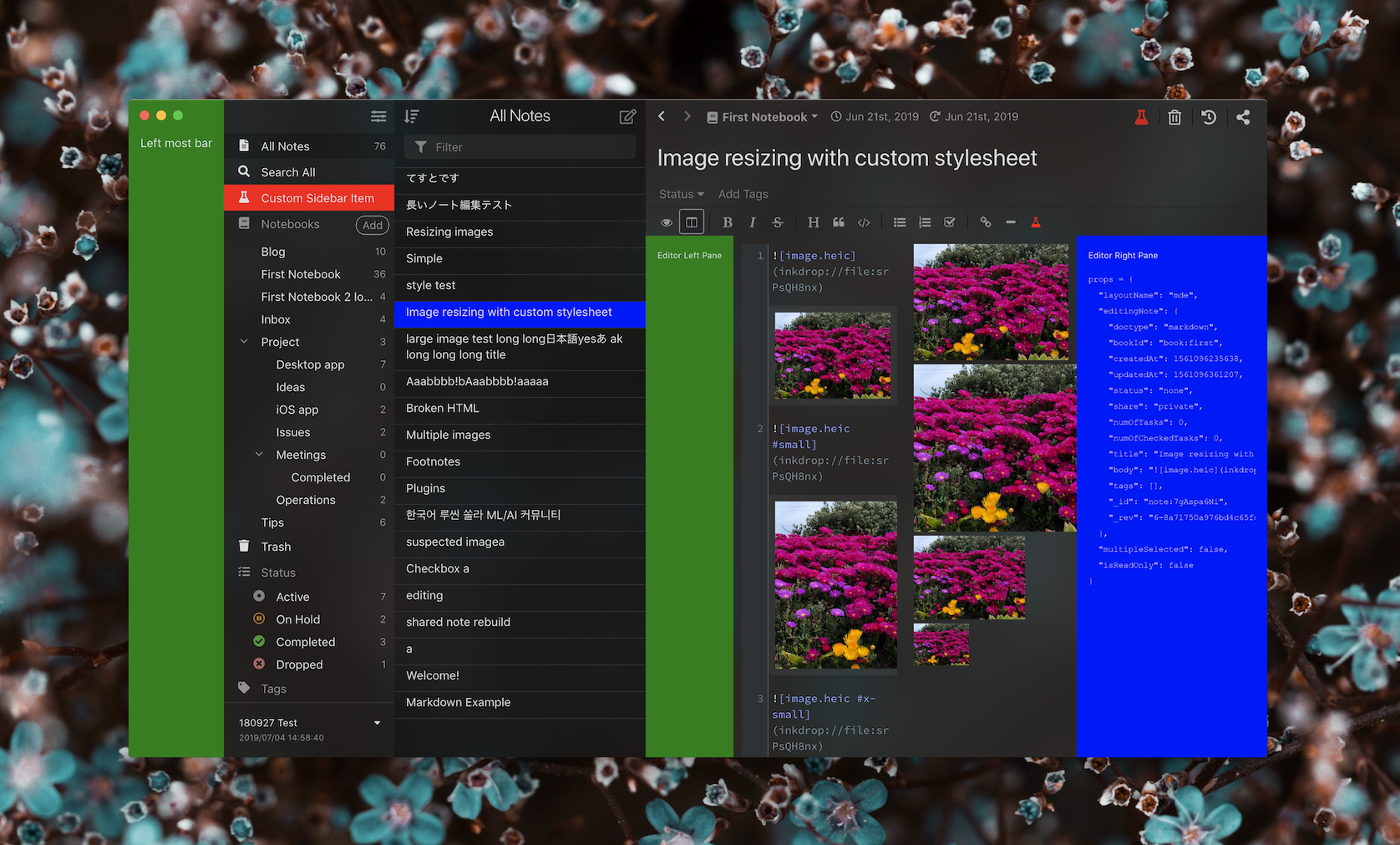
It accompanies the Extending the UI guide. The full set of layouts you can target is listed in Layouts.
This plugin is not published to the plugin registry — it's meant to be cloned, read, and run locally:
git clone https://github.com/inkdropapp/layout-example-plugin.git
cd layout-example-plugin
pnpm install
pnpm build
ipm link --dev
ipm link --dev symlinks the directory into Inkdrop's dev/packages, so it won't
disturb your installed plugins. Reload the app afterwards to pick it up.
Toggle each component from the menu: Plugins → layout-example → …
| Example | Layout | Source |
|---|---|---|
| Dialog opened by a command | modal |
src/message-dialog.tsx |
| Bar left of the sidebar | main:full |
src/left-most-bar.tsx |
| Sidebar menu item | sidebar-menu |
src/sidebar-menu-item.tsx |
| Pane left of the editor | mde |
src/editor-left-pane.tsx |
| Pane right of the editor | mde |
src/editor-right-pane.tsx |
| Editor header button | editor-header |
src/editor-header-button.tsx |
| Editor toolbar button | editor-toolbar |
src/editor-toolbar-button.tsx |
| Editor status bar item | editor-status-bar |
src/editor-status-bar-item.tsx |
| Custom note list item view | — | src/note-list-item-view.tsx |
The note list item view isn't placed in a layout: it's registered under the reserved
component name CustomNoteListItemView, which the note list renders in place of its
built-in row.
Three supporting modules are worth reading too:
src/index.ts— the plugin'sactivate(env)/deactivate(env)entry point.src/env.ts— captures theEnvironmenthanded toactivate()so the rest of the plugin can reach it without the discouraged globalinkdrop.src/app-components.tsx— borrowsButton,SideBarMenuItem, andStreamlineIconfrom the app's component registry.
pnpm dev        # rebuild lib/ on change
pnpm typecheck
pnpm lint
pnpm format
The plugin is written in TypeScript, bundled with tsdown, typed
with @inkdropapp/types, and checked with
oxlint and
oxfmt.