week06 jeongsik1
- ES6 이전: 비동기로 콜백 함수 (콜백헬, 콜백함수 에러처리 어려움)
- ES6: Promise, Generator 사용해서 비동기 처리
-> Promise는 promiseResult를 사용하거나 에러처리 시 후속 처리 메서드 사용 필요 (복잡하고 가독성 좋지 않음)
-> Generator는 코드 장황하고 가독성 나쁨. 무엇보다 어려움.
- ES8: async, await 등장 (비동기를 마치 동기처럼 사용해서 쉽고 가독성이 좋음)
const p = new Promise((res) => res("this is promiseResult"))

console.log(p)        // Promise {<fulfilled>....
console.log(typeof p) // 'object'
console.log(await p)  // 'this is promiseResult'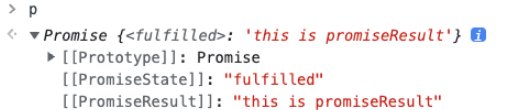
async 키워드를 사용한 함수는 반드시 Promise를 반환한다.
await 또는 then 메서드를 사용해서 함수를 비동기를 관리하기 위해선 async가 필요하다.
반드시 Promise 앞에서 사용해야 한다.
await는 쉽게 생각하면 Promise의 promiseResult 값을 가져올 수 있다.
Promise만 있던 시절에는 then을 사용해서 인수로 불러야만 promiseResult 값을 가져올 수 있어 복잡하고 불편하다.
const p = new Promise((rlv) => rlv("this is promiseResult"))
p.then(
    (v) => console.log(v), // v의 인수로 Promise의 promiseResult값인 "this is promiseResult"가 들어온다. (상태가 fulfilled인 경우)
    (e) => console.error(e) // e의 인수로Promise의 promiseResult값인 error 객체가 들어온다. (상태가 rejected인 경우)
)

console.log(await p) // "this is promiseResult"Promise
const add = (x,y) => {
    return new Promise(res => res(x+y))
}
result = add(1,2) // promise object
result
    .then((res) => console.log(res))
    .catch((err) => console.error(err))
    .finally((err) => console.log('코드종료'))
async/await
const add = async(x,y) => x + y

try {
    const result = await add(1,2) // 3
} catch (err) {
    console.error(err)
} finally (
    console.log('코드 종료')
)- 제너레이터는 함수이다. (특이한 함수)
- 함수 호출자에게 함수 실행의 제어권을 양도할 수 있다. 함수가 호출되면 일반 함수는 더 이상 제어할 수 없는 반면, 제너레이터 함수는 가능하다. (멈출수도, 다시 시작할 수도, 인수를 넘길 수도 있다.)
- 제너레이터 함수 호출시 함수 내 코드가 실행되는게 아닌 제너레이터 객체를 반환한다.
- 화살표 함수 사용 불가, 생성자 함수로 호출 불가
// 제너레이터 함수 선언문
function* genDecFunc() {
    yield 1;
}

// 제너레이터 함수 표현식
const genExpFunc = function* () {
    yield 1;
};

// 제너레이터 메서드
const obj = {
    *genObjMethod() {
        yield 1;
    },
};

// 제너레이터 클래스 메서드
class MyClass {
    *genClsMethod() {
        yield 1;
    }
}

// 키워드 표기 방법
function* genFunc() { yield 1 } // 권장
function * genFunc() { yield 1 }
function *genFunc() { yield 1 }
function*genFunc() { yield 1 }- 제너레이터 함수 호출시 함수 내 코드가 실행되는게 아닌 제너레이터 객체를 반환한다.
- 제너레이터 객체는 이터러블이면서 이터레이터이다.
- return, throw 메서드를 갖는다.
function* genFunc() {
    try {
        yield 1;
        yield 2;
        yield 3;
    } catch (e) {
        console.error(e);
    }
}
// next 메서드
const generator1 = genFunc();   // 제너레이터 객체 생성
console.log(generator1.next()); // {value: 1, done: false}
console.log(generator1.next()); // {value: 2, done: false}
console.log(generator1.next()); // {value: 3, done: false}
console.log(generator1.next()); // {value: undefined, done: true}

// throw 메서드
const generator2 = genFunc();   // 제너레이터 객체 생성
console.log(generator2.next()); // {value: 1, done: false}
console.log(generator2.throw('Error!!')); // {value: undefiend, done: true}
console.log(generator2.next()); // {value: undefined, done: true}

// return 메서드
const generator3 = genFunc();   // 제너레이터 객체 생성
console.log(generator3.next()); // {value: 1, done: false}
console.log(generator3.return('return!')); // {value: 'return!', done: true}
console.log(generator3next()); // {value: undefined, done: true}
호출자에서 인수값 제어하기
function* genFunc() {
    const x = yield 1;
    const y = yield x + 10;
    return x + y;
}

const generator = genFunc(0);   // 제너레이터 객체
console.log(generator.next()); // {value: 1, done: false}
console.log(generator.next(10)); // {value: 20, done: false}
console.log(generator.next(20)); // {value: 30, done: false}
console.log(generator.next()); // {value: undefined, done: true}