feat: style enterprise feature terms and activate their tooltips - #413
feat: style enterprise feature terms and activate their tooltips#413JakeSCahill wants to merge 7 commits into
Conversation


Replicates the exact HTML emitted by the enterprise inline macro
(docs-extensions-and-macros#249, DOC-887) so the enterprise-feature
class can be developed and styled against real markup in the UI
preview.

✅ Deploy Preview for docs-ui ready!
To edit notification comments on pull requests, go to your Netlify project configuration. |


|
Important Review skippedAuto incremental reviews are disabled on this repository. Please check the settings in the CodeRabbit UI or the ⚙️ Run configurationConfiguration used: Organization UI Review profile: CHILL Plan: Pro Plus Run ID: You can disable this status message by setting the Use the checkbox below for a quick retry:
📝 WalkthroughWalkthroughAdded an AsciiDoc test page for enterprise macro rendering. The page covers default linked output, custom feature xrefs, unlinked output, and the Estimated code review effort: 1 (Trivial) | ~3 minutes 🚥 Pre-merge checks | ✅ 5✅ Passed checks (5 passed)
✨ Finishing Touches🧪 Generate unit tests (beta)
Thanks for using CodeRabbit! It's free for OSS, and your support helps us grow. If you like it, consider giving us a shout-out. Comment |

![coderabbitai[bot]](https://avatars.githubusercontent.com/in/347564?s=60&v=4)

There was a problem hiding this comment.
Actionable comments posted: 1
🤖 Prompt for all review comments with AI agents
Verify each finding against current code. Fix only still-valid issues, skip the
rest with a brief reason, keep changes minimal, and validate.

Inline comments:
In `@preview-src/enterprise-macro-test.adoc`:
- Line 11: The fixture uses placeholder href="#" values instead of generated
macro targets. In preview-src/enterprise-macro-test.adoc, update line 11 to the
licensing-page URL produced by enterprise:Continuous Data Balancing[], and
update line 19 to the feature xref URL produced by enterprise:Tiered
Storage[xref=manage:tiered-storage.adoc].
🪄 Autofix
Fix all unresolved CodeRabbit comments on this PR:
- Push a commit to this branch (recommended)
- Create a new PR with the fixes
ℹ️ Review info
⚙️ Run configuration
Configuration used: Organization UI
Review profile: CHILL
Plan: Pro Plus
Run ID: 82821221-12d5-4740-9732-f77e0dd3c3ed
📒 Files selected for processing (1)
preview-src/enterprise-macro-test.adoc
The enterprise inline macro (docs-extensions-and-macros#249, DOC-887)
emits spans with the enterprise-feature class. Style them with the
glossary-style dotted underline plus a small lock glyph, both in
--link-highlight-color so dark mode adapts, and activate tippy on
data-enterprise-tooltip. Verified in the UI preview in light and dark
modes, including tooltip hover.

|
Styling implemented on this branch (was previously markup fixtures only): dotted |
 JakeSCahill
changed the title
JakeSCahill
changed the title
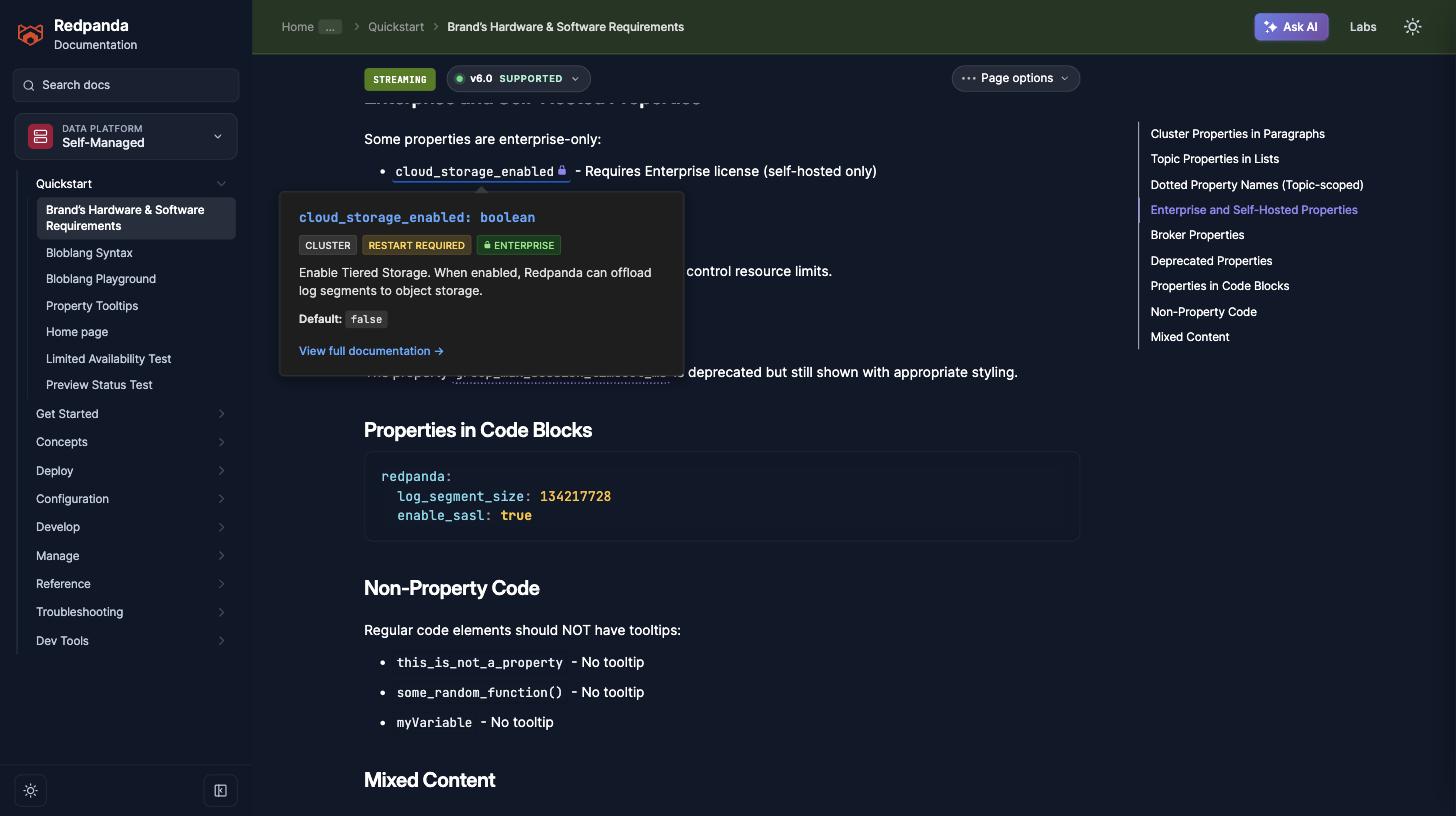
Enterprise-only configuration properties now carry the same visual
vocabulary as enterprise feature terms: the lock icon appears inline
after the property name (new is-enterprise-property class, set by the
property tooltip JS) and inside the tooltip's enterprise badge. The
lock SVG moves to a shared --enterprise-lock-icon variable, filled with
--link-highlight-color inline and currentColor in badges so both themes
adapt.
|
Extended the lock treatment to enterprise-only configuration properties, so one icon means "enterprise-gated" everywhere:
Verified in the built preview: |
The 0.7em inline and 0.8em badge locks were hard to read at body font
sizes.
The variable landed in the html:not([data-theme=dark]) block, so in
dark mode the mask resolved to nothing and the lock rendered as a solid
square. Move it to the theme-independent :root block. Caught while
screenshotting the feature in dark mode.
|
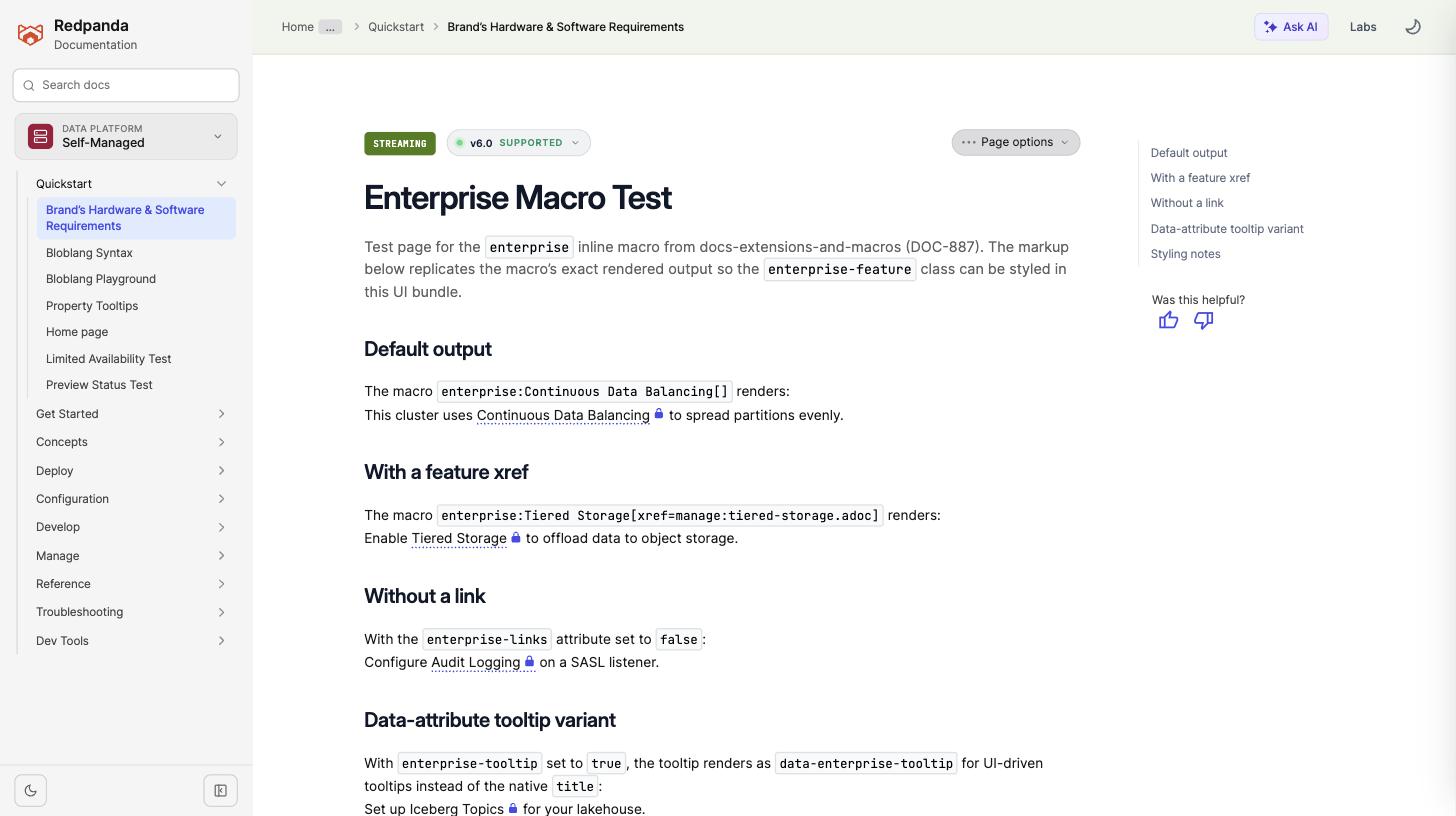
Screenshots of the final treatment (0.9em lock, dark-mode variable fix included). Images live on the Enterprise macro terms, light mode - dotted underline + lock on all four output variants:
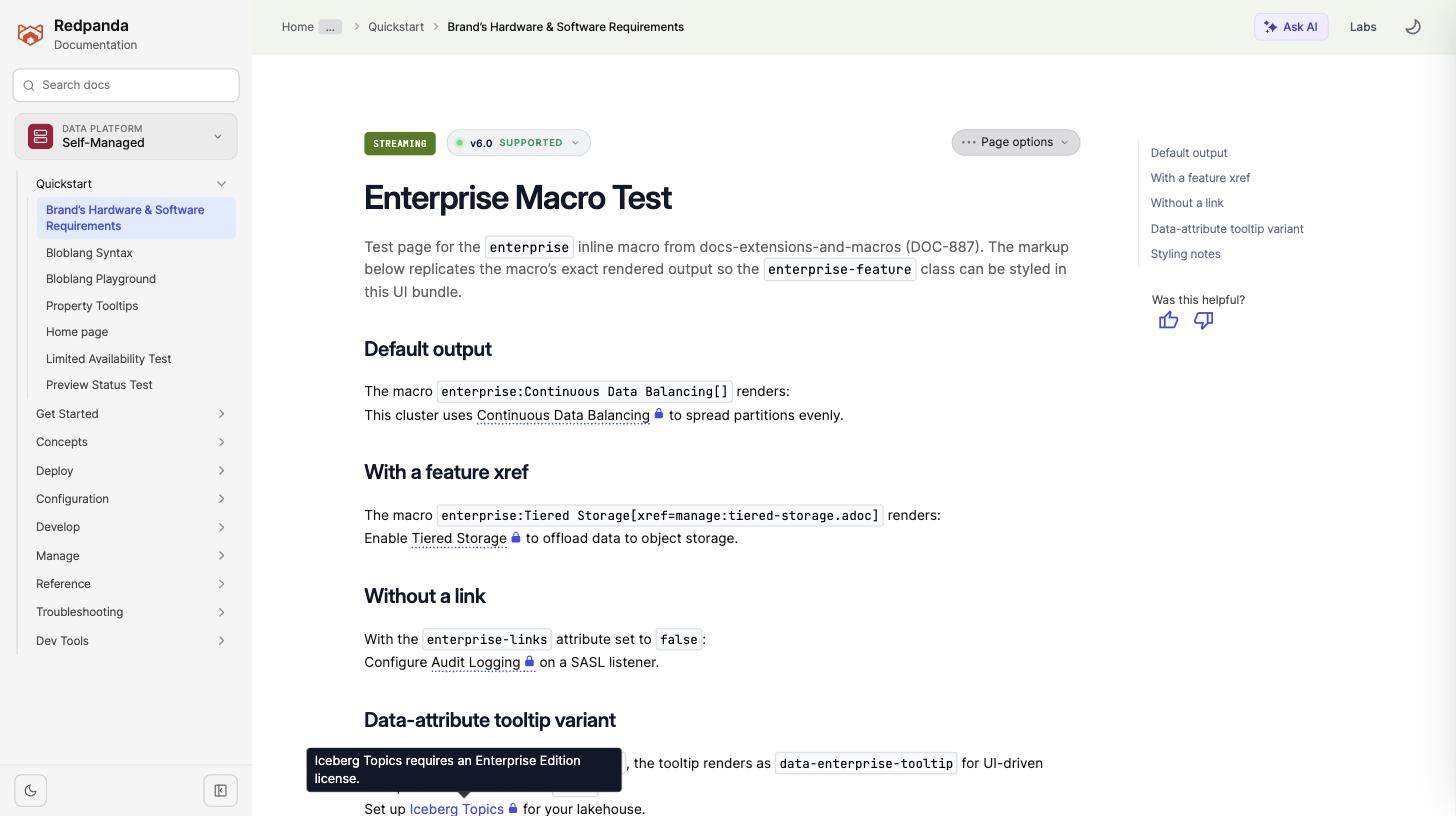
Tooltip on hover (
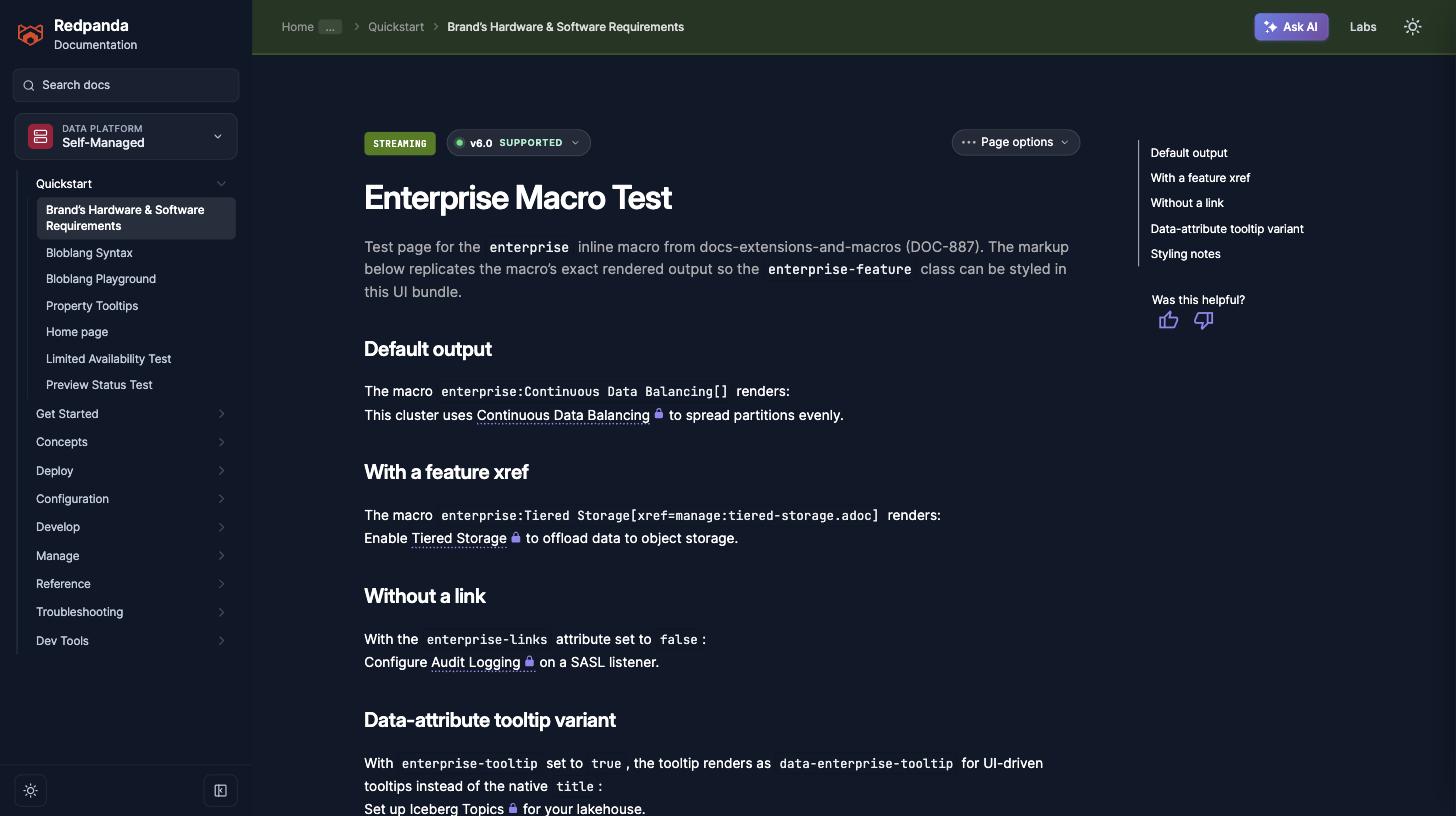
Dark mode - the lock and underline pick up the dark
Enterprise-only property, dark mode - inline lock on
Note the last commit ( |
Expands the test page from four basic shapes to the macro's full
surface: default, feature xref, display text override, tooltip
override, links disabled, tooltip disabled, the data-enterprise-tooltip
variant, and an unstyled custom role. Adds stress contexts for the lock
glyph and underline (multiple terms with punctuation, long names
wrapping in narrow containers, list items, table cells, admonitions)
and shows the shared lock on code.is-enterprise-property alongside a
plain code element for comparison.

The enterprise macro fixture replicated the macro's rendered markup but
used href="#" everywhere, so the two sections that demonstrate link
resolution did not show where the macro actually points.

buildEnterpriseContent (macros/enterprise.js:215) links to the feature
page whenever the registry entry resolves an xref and only falls back to
the licensing page when it does not. So the default-output section now
uses Topic Deletion Control, which the registry deliberately leaves
without an xref ("No dedicated feature page"), and the feature-xref
section keeps Tiered Storage. Both hrefs are the published URLs those
resource IDs resolve to.

The remaining sections keep placeholder targets because they vary only
tooltip, role, and link handling; the intro says so.

Co-Authored-By: Claude Opus 5 <noreply@anthropic.com>
1 participant

Companion to docs-extensions-and-macros#249 (DOC-887): implements the visual treatment for enterprise feature terms so readers learn to recognize license-gated features at a glance.
What this adds
src/css/tooltips.css, alongside the glossary-term rules): a dotted underline in--link-highlight-colormatching the glossary affordance, plus a small lock glyph after the term rendered as an SVG mask filled with the same variable, so dark mode adapts automatically.src/js/12-activate-tooltips.js): elements withdata-enterprise-tooltipare activated as tippy tooltips with the site's standard config. The macro's defaulttitlevariant keeps the native browser tooltip, so pages work before and after this UI change.preview-src/enterprise-macro-test.adoc): all four macro output shapes as fixtures, with the styling notes describing the implemented treatment.Verification
Built the UI preview (
gulp preview:build, lint passes) and verified in Chrome: dotted underline + lock glyph on all four fixtures in light mode, tippy tooltip rendering on hover for thedata-enterprise-tooltipvariant, and automatic adaptation in dark mode via the--link-highlight-coloroverride.🤖 Generated with Claude Code