
Build Real-Time Meeting Intelligence with Zoom RTMS


Arlo is an open-source reference implementation that demonstrates the power of Zoom's RTMS (Real-Time Media Streams) APIs. It shows developers how to build meeting assistants that capture live transcripts without requiring a bot in the meeting.
|
|
Note: This is a starting point for developers. The industry verticals are illustrative examples showing what's possible with RTMS.

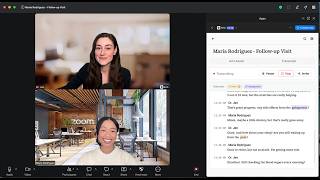
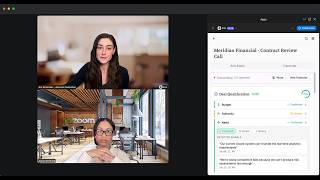
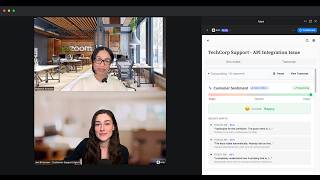
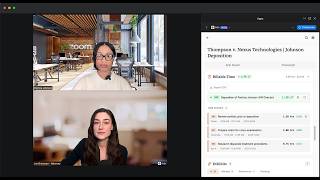
Choose your workflow — each vertical is tailored to your industry
| Healthcare | Sales | Support |
|---|---|---|
 |
 |
 |
| Watch Demo | Watch Demo | Watch Demo |
| Legal | Notes |
|---|---|
 |
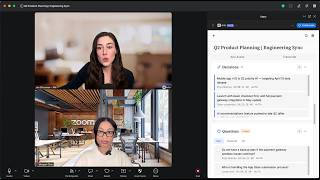 |
| Watch Demo | Watch Demo |
| Feature | Description |
|---|---|
| Live Transcription | Real-time captions via RTMS (< 1 second latency) |
| Voice Commands | Say "Arlo, summarize" or "Arlo, action items" during meetings |
| AI Insights | Summaries, action items, and next steps powered by OpenRouter |
| Full-Text Search | Search across all your meeting transcripts instantly |
| Chat with Transcripts | Ask questions about your meetings using AI |
| Meeting Highlights | Create bookmarks with timestamps for key moments |
| Export Options | Download WebVTT files or Markdown summaries |
| Dark Mode | Automatic OS detection with manual toggle |
| Industry Verticals | Specialized modes: Arlo for Notes, Healthcare, Legal, Sales, and Support |
AI features work out of the box — no API key required! Arlo uses OpenRouter with free models (Gemini, Llama). Optional: add your own
OPENROUTER_API_KEYfor higher rate limits.
Control Arlo hands-free during meetings. Just say the wake word followed by a command:
| Command | What It Does |
|---|---|
| "Arlo, summarize" | Generate a meeting summary |
| "Arlo, action items" | Extract action items and to-dos |
| "Arlo, highlight this" | Create a bookmark at the current moment |
| "Arlo, decisions" | Show key decisions made |
| "Arlo, questions" | Show open/unanswered questions |
| "Arlo, send to chat" | Send summary to meeting chat |
| "Arlo, help" | Show available commands |
Alternate wake words: "Hey Arlo", "Hi Arlo"
Responses appear inline in the meeting view. You can toggle response visibility in Settings.
Access settings via the gear icon in the app. Available options:
| Setting | Description |
|---|---|
| Auto-open in meetings | Automatically open Arlo when you join scheduled meetings |
| Auto-start transcription | Begin transcription immediately when the app opens |
| Setting | Description |
|---|---|
| Show sample data | Display example data to demonstrate features. Turn off to only see real meeting data. |
| Setting | Description |
|---|---|
| Enable Chat Notifications | Send automatic messages to Zoom chat when transcription events occur |
| Event toggles | Choose which events trigger notifications (start, pause, resume, stop, restart) |
| Message templates | Customize the message text for each event. Use [meeting-id] as a placeholder. |
| Setting | Description |
|---|---|
| Show Arlo Responses | Display voice command responses in the meeting view. Turn off for cleaner demos. |
| Setting | Description |
|---|---|
| Start/Stop via REST API | Test RTMS control using Zoom's participant REST API instead of the client SDK. Useful for automation and testing. |
| Setting | Description |
|---|---|
| AI Provider | Choose between OpenRouter (default, free), Anthropic, OpenAI, or Custom |
| API Key | Your API key (stored locally, never sent to Arlo's servers) |
| Model | Select which AI model to use for summaries and insights |
Before you begin, ensure you have:
| Requirement | Why You Need It |
|---|---|
| Node.js 20+ | Runtime for backend services |
| Docker Desktop | Runs PostgreSQL and all services |
| ngrok | Creates secure tunnels for Zoom webhooks |
| Zoom Account | To create and configure your Zoom App |
This app requires RTMS access from Zoom. RTMS (Real-Time Media Streams) enables live transcript streaming.
Request RTMS Access — Apply early, approval may take a few days.
# Clone the repository
git clone https://github.com/zoom/arlo.git
cd arlo
Start ngrok to create a public URL for Zoom webhooks:
# Option A: Static domain (recommended - free, doesn't change)
ngrok http 3000 --domain=your-name.ngrok-free.app

# Option B: Random domain (changes each restart)
ngrok http 3000
Tip: Get a free static domain at ngrok dashboard → Domains to avoid reconfiguring Zoom settings.
Keep this terminal running and note your URL (e.g., https://your-name.ngrok-free.app).
- Go to Zoom Marketplace → Develop → Build App
- Select General App → name it (e.g., "Arlo Meeting Assistant")
- Copy your Client ID and Client Secret
cp .env.example .envEdit .env with your values:
# From Zoom Marketplace (Step 2)
ZOOM_CLIENT_ID=your_client_id
ZOOM_CLIENT_SECRET=your_client_secret

# Your ngrok URL (Step 1)
PUBLIC_URL=https://your-name.ngrok-free.app

# Generate secrets (run these commands, paste the output)
SESSION_SECRET=       # node -e "console.log(require('crypto').randomBytes(32).toString('hex'))"
REDIS_ENCRYPTION_KEY= # node -e "console.log(require('crypto').randomBytes(16).toString('hex'))"In Zoom Marketplace → Your App:
Basic Information
| Setting | Value |
|---|---|
| OAuth Redirect URL | https://YOUR-NGROK-URL/api/auth/callback |
| OAuth Allow List | https://YOUR-NGROK-URL |
Scopes
Add these OAuth scopes:
meeting:read— Read meeting detailsuser:read— Read user profile
Features → Zoom App SDK
- Click Add APIs and enable required capabilities
- Enable RTMS → Transcripts (requires RTMS approval)
Features → Surface
| Setting | Value |
|---|---|
| Home URL | https://YOUR-NGROK-URL |
| Domain Allow List | https://YOUR-NGROK-URL |
Features → Event Subscriptions
| Setting | Value |
|---|---|
| Event notification endpoint | https://YOUR-NGROK-URL/api/rtms/webhook |
| Events to subscribe | meeting.rtms_started, meeting.rtms_stopped |
Replace
YOUR-NGROK-URLwith your actual ngrok URL (e.g.,your-name.ngrok-free.app)
docker-compose up --buildWait for all services to start:
- PostgreSQL database
- Backend API (port 3000)
- Frontend (port 3001)
- RTMS service (port 3002)
- Start or join a Zoom meeting
- Click Apps in the toolbar
- Find and open your app
- Click "Start Arlo" to begin transcription
- Watch live transcripts appear in the Transcript tab
- Switch to Arlo Assist to try AI features:
- Generate meeting summaries
- Extract action items
- Ask questions about your meeting
Arlo includes specialized modes demonstrating RTMS capabilities for different industries. Each vertical shows how real-time transcription can power domain-specific features.
Full-Featured Note-Taking — Meeting summaries, key decisions, action items, and open questions tracked automatically.



Clinical Documentation — SOAP notes auto-generation, medication and symptom detection, clinical terminology highlighting.


Deposition Assistance — Real-time contradiction detection, billable time tracking with export, and exhibit management.


Deal Intelligence — BANT qualification tracking (Budget, Authority, Need, Timeline), competitor mentions, and commitment detection.

Agent Assistance — Live customer sentiment meter with trend analysis and emotional shift tracking.

Building your own vertical? Fork this repo and customize the frontend components in
frontend/src/features/for your specific use case.
Database / Prisma Errors
"Cannot find module '.prisma/client'"
docker-compose exec backend npx prisma generate
docker-compose restart backend
"Can't reach database server"
docker-compose restart postgres backendTables don't exist
docker-compose exec backend npx prisma db pushClean Restart
If you're having persistent issues:
# Stop everything and remove volumes
docker-compose down -v

# Rebuild with fresh node_modules
docker-compose up --build -V
ngrok Issues
App stops working after restarting ngrok?
If using a random domain:
- Copy the new ngrok URL
- Update
PUBLIC_URLin.env - Update all URLs in Zoom Marketplace settings
- Restart:
docker-compose restart backend
Pro tip: Use a static ngrok domain (free) to avoid this!
More Help
See the full Troubleshooting Guide for additional issues.
| Document | Description |
|---|---|
| Architecture | System design and data flow |
| Project Status | Roadmap and current progress |
| Specification | Feature spec and milestones |
| Troubleshooting | Common issues and fixes |
| CLAUDE.md | Quick reference for AI assistants |
arlo/
├── backend/           # Express API server + Prisma ORM
├── frontend/          # React Zoom App (CRA)
├── rtms/              # RTMS transcript ingestion service
├── docs/              # Documentation
└── docker-compose.yml # Development environment
docker-compose up                    # Start all services
docker-compose logs -f backend       # View backend logs
docker-compose restart backend       # Restart a service
docker-compose down -v               # Stop and remove volumes
npm run db:studio # Open Prisma database GUI| Layer | Technology |
|---|---|
| Frontend | React 18, Zoom Apps SDK, Base UI |
| Backend | Node.js 20, Express, Prisma |
| Database | PostgreSQL 15 |
| AI | OpenRouter (free models available) |
| Real-time | WebSocket + RTMS SDK |
This is an open-source starter kit designed to be forked and customized!
- Fork this repository
- Customize for your use case
- Share improvements via pull request
- Multi-language transcription support
- Custom AI models (local LLMs)
- Team workspaces and sharing
- Calendar integration
- Video replay with transcript sync
This application supports Zoom for Government (ZfG) deployments:
# In your .env file
ZOOM_HOST=zoomgov.com- Create your app in the Zoom for Government Marketplace
- Use ZfG-specific URLs in your configuration
Note: RTMS availability on ZfG may differ. Contact your Zoom representative for ZfG-specific access.
This reference implementation is designed for learning and prototyping. Before production deployment:
| Area | Development | Production Recommendation |
|---|---|---|
| Credentials | .env file |
Secrets manager (AWS, Vault, Azure) |
| Tokens | PostgreSQL + AES | Add encryption at rest |
| Sessions | In-memory | Redis or database-backed |
| HTTPS | ngrok tunnel | Load balancer with TLS |
| WebSockets | Single instance | Redis pub/sub for scaling |
See Known Limitations for additional considerations.
This is a reference implementation with intentional simplifications:
| Pattern | Current | Production Recommendation |
|---|---|---|
| PKCE Storage | In-memory Map | Redis with TTL |
| WebSocket Scaling | Single-instance | Redis pub/sub adapter |
| Retry Logic | Basic 401 retry | Exponential backoff |
| Webhook Processing | Synchronous | Queue-based async |
| Input Validation | Basic checks | Schema validation (Zod) |
- Issues: GitHub Issues
- Discussions: GitHub Discussions
- RTMS Access: Request Form
- Zoom Developer Forum: devforum.zoom.us
MIT License — See LICENSE for details.
Ready to build your own meeting assistant?